Feeler: Clock Replacement Multi Gauge

This site may earn a commission from merchant affiliate
links, including eBay, Amazon, Skimlinks, and others.

Sounds like a nifty mod and feature. Where I live and mostly drive we only have 3 outside temperatures: 1 - not hot, 2 - hot, and 3 - really hot!!! :mad:. When it's really hot, I prefer not knowing the actual temp.

Cool feature nonetheless ;)
 
It will be a challenge to reuse the OEM display. It's a vacuum fluorescent display driven by a proprietary IC with integrated clock function, so difficult/impossible to tap into the display for other purposes.

I have already removed the VFD display from a clock assembly pcb, figured out who makes it and how the interface works and I'm in the process of sourcing a new driver. I'm going to interface the new driver to a micro controller (which will handle processing sensor inputs and keeping time) and then have a custom PCB made where I'll install the driver, micro, passives and the VFD display.

I am also looking at trying to source a similar sized display with similar charicteristics so that it looks OEM but has a little more flexibility as the OEM display is only 3.5 digits, it's kind of limiting.
 
I'd love to have outside temp in place of the OEM clock (no real need for clock since my phone and stereo deck have that). Doesn't have to be the OEM digital screen but if it looked similar that would be ideal.
 
I like the idea of option 1 a lot. Assuming this fits in the earlier style dash. A new unit with factory fit and display coloring that matches the greenish interior lighting would be awesome as well. Especially if more features could be added to it like altitude, temp, and a compass.
 
I have already removed the VFD display from a clock assembly pcb, figured out who makes it and how the interface works and I'm in the process of sourcing a new driver. I'm going to interface the new driver to a micro controller (which will handle processing sensor inputs and keeping time) and then have a custom PCB made where I'll install the driver, micro, passives and the VFD display...

Cool! If you can figure out how the filament voltage is controlled on the OEM display I would love to know because I want to boost the brightness on mine and I'm pretty sure I can do this with just a moderate (20-30%) increase in filament voltage.

...I am also looking at trying to source a similar sized display with similar charicteristics so that it looks OEM but has a little more flexibility as the OEM display is only 3.5 digits, it's kind of limiting.

I've looked at several OLED displays that could potentially fit in the clock space. I thought that would provide maximum flexibility since you could then both mimic the OEM display or do fancier things if you wanted. For example, I breadboarded up a 3D magnetometer IC and microprocessor that I wanted to use to determine how close I was to being level when camping in my RTT. Basically a sensitive version of the inclinometer found in some vehicles. There are many inexpensive solid state sensors on the market, and so lots of opportunities to interface stuff to the display.
 
Thanks for the feedback everyone. I'll get working. I am going to work on option #1 since the majority of folks seem interested in that. Based on feedback that some folks would like some advanced features (altimeter, compass), I am going to try and source a new display that will look just like the OEM (same color as OEM, including variable illumination as factory), but it will have 4 digits (maybe even alphanumeric), I am going to play around with original display too. Too soon to tell which direction will be best, but I'm a stickler for details so it'll have to look 100%.

Based on feedback here, I am thinking it'll have the following functions....

1) Clock, this will work pretty much as it does today. H to adjust hours, M to adjust minutes. H & M together to switch between 12 Hour Time and 24 Hour Time.
2) Temperature 1, F or C, from -99 to 999. You'll use M to flip back and forth between F and C. H will be unused. I will include temperature probes, I'll look for something readily available and high quality.
3) Temperature 2, F or C, from -99 to 999. Same as above. They will be independent so if you want T1 in F and T2 in C or vice-versa, not a problem.
4) Altimeter (opt), I am going to design this in and for those folks who want it, it'll be extra to cover the cost of the part. It will display altitude in F or M from -999 to 9999. It is likely no units will be displayed because it's unlikely I will be able to fit more than 4 digits in the existing space. You'll use H and M to set the sea level pressure (required for any altimeter that isn't GPS based), and you'll press H and M simultaneously to switch between Feet and Meters.
5) Compass (opt), I will design this in as well, maybe for simplicity sake, if you want the altimeter you also get the compass. It'll read in degrees from 0 to 359 (probably in some increment, 10 degrees). You'll use M to set your zone so that you get a corrected heading based on your location (as true north and magnetic north are not the same).

I can probably include another temperature sensor, at some point it just becomes a limitation of how much space there is on back of unit for additional connectors and how many probes are included for the price.

To cycle through the functions you'll press the :00 button. When you do, you'll see C, t1, t2, A, D, if you stop cycling through it'll display the requested information. Like so...

I know the graphics are pretty basic, but I think they do the job...

multi_png.webp
 
Last edited:
Cool! If you can figure out how the filament voltage is controlled on the OEM display I would love to know because I want to boost the brightness on mine and I'm pretty sure I can do this with just a moderate (20-30%) increase in filament voltage.

That's one of the things I don't know. Just got it desoldered and pulled the part number off the back. Going to put it on the bread board, solder some headers on the original board, jumper everything over and then continue to play with it. The VFD module is a Futaba 4-BT-68Z. I can't find a data sheet for the exact part but on Futaba's site there is a data sheet for a part which looks like it may be a drop in replacement. When I applied 12v to the illumination wire, the display dims and it looks like one of the pins feeding into the VFD module changes voltages, but it's a very small amount. I will try playing with that voltage once I have the bread board fully connected to see if I can get it to go brighter than default.

I've looked at several OLED displays that could potentially fit in the clock space. I thought that would provide maximum flexibility since you could then both mimic the OEM display or do fancier things if you wanted. For example, I breadboarded up a 3D magnetometer IC and microprocessor that I wanted to use to determine how close I was to being level when camping in my RTT. Basically a sensitive version of the inclinometer found in some vehicles. There are many inexpensive solid state sensors on the market, and so lots of opportunities to interface stuff to the display.

Nice, yeah, spent a bit of time researching displays, lots of stuff out there but it's a tight space and I want to make sure the color is a good match and that I can implement a dimming control that matches up with OE. I've got a few parts on order to play with. Have to see how they look \ work.
 
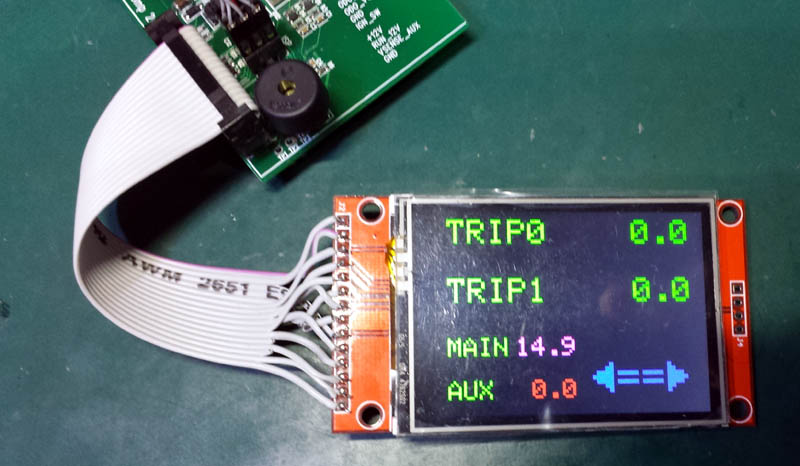
Well, you could go with a touch LCD unit (they're about $8 or so) and ditch the switches...

mqc1.jpg


Testing basic functions:


cheers,
george.
 
Last edited:
Count me in. Following the thread/progress.
 
It will be a challenge to reuse the OEM display. It's a vacuum fluorescent display driven by a proprietary IC with integrated clock function, so difficult/impossible to tap into the display for other purposes. I wanted to just increase the filament voltage on mine to counteract the reduction of phosphor efficiency and resultant dimming over time and gave up even trying to do something as simple as that.
And maybe a flux capacitor is your next project? :-)
 
Cool! If you can figure out how the filament voltage is controlled on the OEM display I would love to know because I want to boost the brightness on mine and I'm pretty sure I can do this with just a moderate (20-30%) increase in filament voltage.


I've looked at several OLED displays that could potentially fit in the clock space. I thought that would provide maximum flexibility since you could then both mimic the OEM display or do fancier things if you wanted. For example, I breadboarded up a 3D magnetometer IC and microprocessor that I wanted to use to determine how close I was to being level when camping in my RTT. Basically a sensitive version of the inclinometer found in some vehicles. There are many inexpensive solid state sensors on the market, and so lots of opportunities to interface stuff to the display.
U2 should get together on a flux capacitor. I'm sure you could nail it . :-) :-)
 
I like option one. Somebody else here has put a camera display in that space, but that seems a bit small for my taste. Is there any reason this would have to be limited to the inputs already mentioned? Why not more, temperature, altitude, wind speed, humidity, inclinometer, Barometric pressure, basically anything you can determine with a sensor. Don't see any reason to duplicate scan gauge or similar capabilities – perhaps better to do something new.
 
I'm interested in option 2. I could then display whatever you want from boost, afr, temp etc. You would gain so much flexibility. I hate putting in after market gauges and have been day dreaming a clean looking alternative.
 
Back
Top Bottom