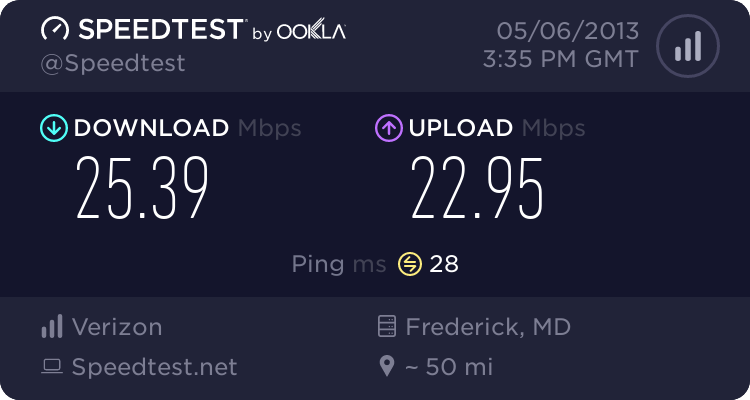
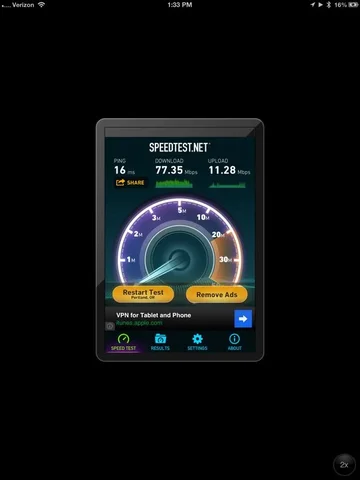
what's your home Internet connection speed?

This site may earn a commission from merchant affiliate
links, including eBay, Amazon, Skimlinks, and others.

e9999

Gotta get out there...
Moderator
Joined
Sep 20, 2003
Threads
1,087
Messages
19,241
Location
US
Wondering how mine compares...


Going Cox cable to 892.11g router to my older MUD pentium computer via external USB wifi antenna.


as measured by

CNET Bandwidth Meter: Online Speed Test - CNET Reviews
(yes, there are better sites, depends on location of servers, etc....)

I'm usually getting around 2 to 5 Mbps


bottom line is the Internet is definitely fine to access with that connection but HD movies are sketchy with that computer. My newer laptops give about the same nominal speed but seem to handle HD movies better.

I did try an (older) computer with a direct ethernet cable to the wifi router and it was about the same speed, maybe a tad less, I forgot, so the radio transmission may not be a major limiting factor.

So may not be a speed demon on paper but OK practically speaking.

The Cox ads do tout it as being significantly faster than what I see, of course.

Surprisingly, I think that at work where I have supposedly a 100 Mbps direct ethernet line, it's not that much more.

Good reasons to contemplate an 802.11n router (besides the microwave issue)?


What numbers are you getting?
 
Last edited:
What is the end number. The "gauge" shows nearing 5Mbps for me, but the end number is 25051 Kbps - or 25Mbps.

Try here: Speedtest.net - The Global Broadband Speed Test

I've found that to be a more solid test. My numbers there are a 32ms ping, 25.52Mbps download, and 3.72Mbps upload.
 
What is the end number. The "gauge" shows nearing 5Mbps for me, but the end number is 25051 Kbps - or 25Mbps.

Try here: Speedtest.net - The Global Broadband Speed Test

I've found that to be a more solid test. My numbers there are a 32ms ping, 25.52Mbps download, and 3.72Mbps upload.

well, having some sort of average number for comparison makes it easy. Your 5Mbps is similar to mine then.

used that speedtest site too. Results vary quite a bit depending on the server you choose though, so it makes sense if you can tailor it to a relevant server but less otherwise. doesn't tell you how fast you get to a specific site. For that I use "Pingplotter". In fact, I'll tell you for comparison that right now

my ping time to MUD is 65ms.


Of course, that doesn't show the capacity of the bandwidth under full/high load. For that, I simply go into youtube and pick a random HD movie that needs to be buffered in full time and check the DL speed. Right now it is varying between 4 and 6 Mbps on the old laptop.


I did find a nice free utility that shows a ton of info on instantaneous speeds and stats, can be set to show as a little window floating on your screen. Great for wannabe IT nerds (like me?:)): it's "Bitmeter 2" that can be downloaded from Cnet. Check it out if you're curious about your speeds.


added: well, I was wrong. I put Bitmeter on my newest laptop and I get up to
15Mbps
download from youtube with that one, so the old computer was indeed a limitation, not just my network. With the newer laptop I can view 1080p in real time downloading with no interruption. (The laptop gives about 6-8Mbps on the cnet test above)
 
Last edited:
I have Verizon FIOS and am 20 Mb symmetrical.
Crazy fast for residential use.

As far as speed tests go, many of them only measure burst speeds which is what is promised by cable companies using copper. Speed test websites are also subject to traffic loading on nodes so it's always best to select several different sites for your test. I like speedtest.visualware.com. They use large files to test and you will get a more accurate reading, depending on the node.
Visualware also has some neat applications that I use for work.
 
not quite sure what to make of it, but on my newish powerful laptop I just got 6Mbps with the cnet test whereas I show 15Mbps on Bitmeter while viewing HD movies
 
Bitmeter is reporting video stream data rate. That video is not streaming, but being cached on your machine.

15Mb/s is pretty low for HD or even SD for that matter, but it needs to get squished heavily to work well.

what do you mean by low? If I view a 1080 movie and download it at 15Mbps, it will handily buffer extra material, as in downloading 3 or 4 x faster than needed and more than keeping up. How is that low for SD? (I am talking about youtube here so it may be more compressed than others, not sure.)

been wondering about netflix and the like. Do they impose a strict streaming (as in no buffer at all) policy or can you buffer as you would on Youtube say? If the former, what download speed is the minimum you'd need to watch without cutouts?
 
mine

I have bellsouth in our area.
download=5.8mbps
upload = 0.35mbps
We are cable free, ie no cable bill, but spend about
$40 bucks a month for netflix (streaming and delivered dvds, hulu plus and renting a few movies online. Just finished installing my new TV antenna so we are ready to watch fall football as well.

We watch netflix and amazon all the time on our roko devise and wii
I did run new cat5e cable from phone line outside to inside of house. It makes all the difference in the world.
 
what do you mean by low? If I view a 1080 movie and download it at 15Mbps, it will handily buffer extra material, as in downloading 3 or 4 x faster than needed and more than keeping up. How is that low for SD? (I am talking about youtube here so it may be more compressed than others, not sure.)

been wondering about netflix and the like. Do they impose a strict streaming (as in no buffer at all) policy or can you buffer as you would on Youtube say? If the former, what download speed is the minimum you'd need to watch without cutouts?

To be honest I have no idea what codec Netflix uses, but I can find out.
I work in broadcast TV so the lowest HD bitrate we deal with is 145Mb/s. We send Quicktimes out to clients for approval and deal with digital delivery systems, but they're all running fairly high bit rates.

Just because something is labeled as HD 1080i or 1080Psf, that doesn't mean it looks good. It all comes down to data rate. Uncompressed 1080i is 1.45Gb/s. Take that and squish it down to 15Mb/s and it looks like radio to me.
 
To be honest I have no idea what codec Netflix uses, but I can find out.
I work in broadcast TV so the lowest HD bitrate we deal with is 145Mb/s. We send Quicktimes out to clients for approval and deal with digital delivery systems, but they're all running fairly high bit rates.

Just because something is labeled as HD 1080i or 1080Psf, that doesn't mean it looks good. It all comes down to data rate. Uncompressed 1080i is 1.45Gb/s. Take that and squish it down to 15Mb/s and it looks like radio to me.


ah, never stopped to think about what the HD nominal rate is, still stuck on the old 7GB = 1 hr of movie but that was SD. Yes, I'm getting 1.5Gb/s guessing 3x8 bits per pixel and 30fps. Wow, so if I can see it at 15Mbps that is a 1/100 compression then? pretty outlandish. Yet amazingly, the image is stunningly beautiful and detailed...
And I think I remember Netflix writing that they need 3Mbps download capability (or was it 10) for their HD system to work... Not asking for 1Gbps for sure...
 
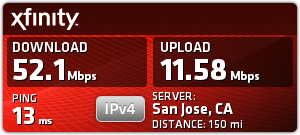
My results

435299024.png
 
Last edited:
Mine is (advertised as) comparable to RobRed's, but my real world speed is severely limited by my old Linksys router (which is due for a replacement anyway). Wish I had enough networking smarts to at least tweak it to work well until we get rid of it.
 
since I started this old thread, I've checked speeds a bunch of times on speedtest.net and I get about 14Mbps down from my 811g. About 18 with an ethernet cable directly off my router. Which is about exactly what Cox promises. (I'm one step up from lowest speed -3Mbps IIRC- and probably not necessary for what I do.) No problem at all watching HD movies off netflix. Never cuts out.

Short of doing something really demanding, it doesn't seem to me that I'd need faster speeds or even need to upgrade my router to 811n etc.
 
I really hate you guys .. down here the best I can get ( ISP offers on my home area ) it's 4MB which are actually average of 3.5 .. :frown:
 
I'm running at 2. kinda like the LO gear of my tcase. It's slower, sure, but I get a better search tho cause it's looking for a longer period of time.
 
3.4 on sucky HughesNet satellite, the only thing we can get out here.
 
wondering if I should go down to 3Mbps service instead to save some $$....


anybody having a 2 or 3 Mbps connection happy with Netflix HD viewing?
 
Back
Top Bottom