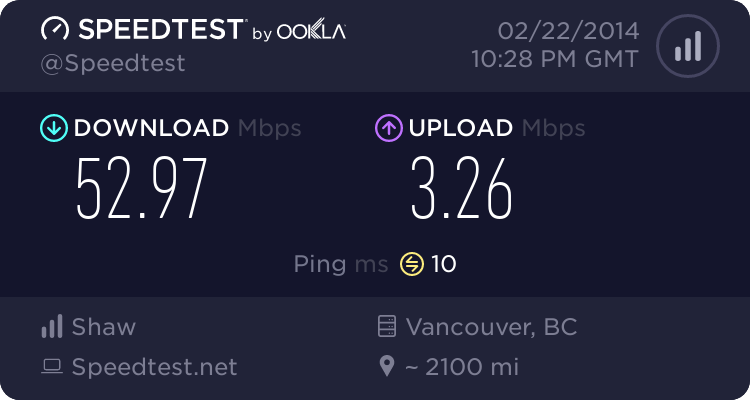
what's your home Internet connection speed?

This site may earn a commission from merchant affiliate
links, including eBay, Amazon, Skimlinks, and others.

Keep in mind what I said in post #4. Many of these speed test sites only measure burst speeds, not sustained data rates. In fact Comcast was advertising very high data rates in the neighborhood of 50Mb/s down. However they throttle it down very quickly so it is not a sustained rate, but they are allowed to advertise it as 50Mb/s.

Over the last year I upgraded to 30Mb/s symmetrical through FIOS. I don't do speed tests, I FTP very large files to known sources/destinations and watch the data rates. Verizon is pretty rock solid both up and down.

Speed tests shouldn't be done through a wireless access point as the AP is subject to RF issues and interference. The most accurate testing is done with your machine hanging outside your firewall with a direct connection to your ISP.
You can then move the connection inside and subdivide your network to see if there is a bottleneck.

Keep in mind that 1 speed test shows you very little. In order to get an accurate sustained data rate analysis you need to transfer large files back and forth to a known source multiple times over the course of several hours. Internet traffic varies from second to second and nodes load and unload constantly.

Visualware makes some real handy dandy applications that shed light on many issues.
 
I'm using Bitmeter on my computers. Nice counter, will record avg max etc speeds, totals etc with graphs and whatnot.
 
I have no idea what the speed is but it's hooked up through the cable TV company so whatever that is. The puter is a newish Dell we bought this year.
 
Speed on my PC is usually never a problem


Our home Wifi on the other hand is hit and miss at home. Seems to work okay on the mobile devices, iPad seeming to have the best results, but it just sucks ass on our Samsung blu ray players. Netflix will drop out constantly on the master bedroom tv.
I'm looking at what would be a wifi router upgrade to add onto the s***ty Ciso wifi modem Shaw hands out. Apparently I have to keep the modem, but just get Shaw to turn off the wifo part when I hook up the new router to it.
 
I'm around 5 down don't know the up. I'm on comcast cable. I haven't checked in awhile so don't know for sure. But I can watch a 720p hdx (edit - or is hdx their lingo for the 1080p movies? Whichever the 720p is called is the one I use and can do it a-ok) movie through vudu on lan connection through my ps3 with no buffering issues through the whole movie. So I would say my speed is just fine
 
This fast

image-2137207825.webp
 
I like the entertainment of these gizmos. In real life try grabbing a large file from http://wireless.fcc.gov/uls/index.htm?job=transaction&page=weekly and get the Licenses file from the Amateur Radio service. It's about 110 Meg in size. My 5Meg test results chokes and takes 13 to 14 minutes. You are limited by the site you pull something from. I started the down load as I started typing (and I am slow-old too). I'm at 9 minutes left, not too good for a 5Meg test. YMMV 73, Larry
 
It's worth checking and figuring out the limiting factors on these systems.

For instance, as things stand now at home, I do normally get the full download speed advertised by Cox for my plan -about 25Mbps IIRC- when I'm connected directly to the cable modem (an older docsys2) with an Ethernet cable. On wifi it's a bit slower -about 16- but not surprising given that it's an old 811g. (These numbers are is with a reasonably powerful and fairly recent laptop. I have an older netbook that goes 3 or 4x slower on wifi.) But it's still plenty fast for HD movies real-time downloading and normal work. So basically no point in upgrading the hardware unless I go for a faster plan eventually if needed. In fact, I have even been toying with the idea of downgrading to a cheaper 3Mbps plan to see if that would still work out for us in practice, but that may be pushing it though.
 
Last edited:
I don't see the throttling of sustained bandwidth in my area from Comcast. I get about 65Mb/15Mb (50/10 is the package), and from a certain bandwidth heavy application which may or may not be used to get Sky Formula 1 broadcasts, even using a proxy and separate encryption (which may explain non-throttling), I see transfers sustain for a long time with no apparent systemic degredation.
 
I have AT&T 18mbps download speed. It seems like it most runs between 12-14 mobs when I check it. 18mbps is probably overkill, but it's not much cheaper to go down in speed. We don't have cable TV, so it's possible to have 4 devices streaming or on the internet at one time in our house.

I got rid of my cable tv because my bill was getting out of control. I think my internet bill is about $65 +tax per month now. AT&T has been reliable, so I'll probably stick with them.
 
FIOSspeedtest.webp


I'm running pretty consistently in this neighborhood now. I bumped up the FIOS again to 80/30 (they were running a promotion), installed a new Linksys (Cisco) 5Ghz access point and I now have both 2.4G and 5G at ridiculous speeds in and around my home. The above speed test was on the 5G wifi.
 
[QUOTE="TXLX100, post: 9188566] ^ Just curious, why do you need that much speed?[/QUOTE]

My first reaction was "is this a real question"? My second thought was that it's a valid question.

1. If you work from home and do it work, it's paramount that you have a wicked fast connection. I cannot describe how frustrating it is To have a laggy remote session to a customer or to your own servers.
2. If you use any bandwidth heavy streaming applications, like telepresence or wideband VoIP, you will use that bandwidth.
3. Bragging rights!

What is more important than your rated connection speed is the equipment in your house on the other side of the modem. Do not use your modem as a router/access point if you can avoid it.

Personally I have a Cisco ASA5505 firewall for routing and other stuff, then a Cisco 1252 access point with some high gain antennas. I never have to "reset" anything and I genuinely get better throughput with this gear than I did using time Warner's cheap modem/router/AP.

I may be biased, but I recommend Cisco gear for your home networking nerds.
 
Bragging rights ;) My wife is Director of IT for a multinational and works from home frequently. She is constantly VNCing in one form or another into one office or another around the world. I remote in to my clients as well quite often.
My router, a new Actiontec provided by Verizon, is my DHCP server as well as a decent firewall. I hung a small Linksys (Cisco) GigE switch that feeds all my wired devices in the house. The Linksys EA6900 router is simply in bridge mode and is serving out dual bands of wifi to wireless clients.
My internal network is pretty peppy just push/pull from machine to machine. It all runs clean from end to end. Not bad for a home network.
 
Gotcha, wasn't trying to be sarcastic or critical. 18mpbs gets it done for me with 2 Roku's, 3 iPads, 2 iPhones, 2 laptops, and a microcell.

I telework a lot, but the limitation for my speed is on the work side, not the connection at home.
 
Back
Top Bottom