GPS shopping - What's the best for all purposes? (Off-roading being one...)

This site may earn a commission from merchant affiliate
links, including eBay, Amazon, Skimlinks, and others.

Keep trying new stuff for off-road topo work including the very toy like iPad apps. However I keep going back to my Lowrance Baja 540C. Just came off a week in the back-sage (not many "woods" out here :D) of Nevada and I laid out the routes ahead of time at home on the full size puter. You can save all your daily tracks/routes/waypoints quite easily...after you figure the darn thing out ;)

Motion X GPS HD isn't very toy like. In fact it has much more capability than several units put together. The motion X guys are rev 16.2 - they are constantly improving the software and maps. All of those updates are no charge. I cant say that about garmin or others. http://gps.motionx.com/downloads/HD/MotionX-GPS-HD-Manual.pdf

The chassis of an iPad can easily be ruggedized with an Otterbox Defender case etc.
 
Last edited:
Motion X GPS HD isn't very toy like. In fact it has much more capability than several units put together. The motion X guys are rev 16.2 - they are constantly improving the software and maps. All of those updates are no charge. I cant say that about garmin or others. http://gps.motionx.com/downloads/HD/MotionX-GPS-HD-Manual.pdf

The chassis of an iPad can easily be ruggedized with an Otterbox Defender case etc.

Don't know if Spresso will respond before or during his trip, but he tried (I think) pretty much every version of map apps for the ipad and he kept having problems with downloading the maps. I'm sure he will have plenty to say about the gps apps. I've had about the same issues with my iphone gps apps. Not very useful for the kind of backcountry travel that we do.

Jack
 
Don't know if Spresso will respond before or during his trip, but he tried (I think) pretty much every version of map apps for the ipad and he kept having problems with downloading the maps. I'm sure he will have plenty to say about the gps apps. I've had about the same issues with my iphone gps apps. Not very useful for the kind of backcountry travel that we do.

Jack

^^^Key!

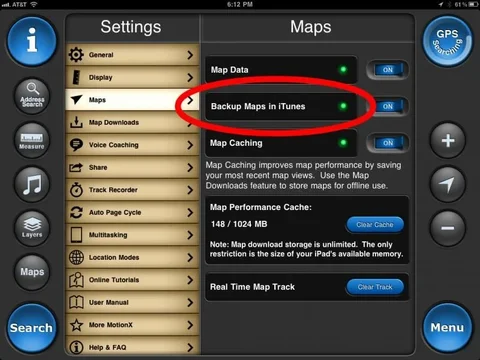
One more nail in the iPad coffin as a true off-road nav system AFAIC (we need more than just a system to show paved and gravel roads...): I had to restore my iPad earlier today. Guess what? No way to back up the map data means the weeks worth of map data downloads are now gone. :mad:

Toy.
 
^^^Key!

One more nail in the iPad coffin as a true off-road nav system AFAIC (we need more than just a system to show paved and gravel roads...): I had to restore my iPad earlier today. Guess what? No way to back up the map data means the weeks worth of map data downloads are now gone. :mad:

Toy.

You're holding it wrong!

Photo Jul 14, 6 12 52 PM.webp


I've had about the same issues with my iphone gps apps. Not very useful for the kind of backcountry travel that we do.

Jack what are the things that are missing from your iphone apps? What makes it useful?
Photo Jul 14, 6 12 52 PM.webp
 
Jack what are the things that are missing from your iphone apps? What makes it useful?

Trying to download the maps. It just take too long to do it wi-fi. Especially when you are trying to download the state.

We (Spresso) and I don't always end up where we planned. Two years ago, we were planning on crossing the northern part of the state from west to east (offroad of course), well the weather changed that for us and we ended up down by Tonopah before it was over. Pretty hard to download that much area. And there are HUGE sections of Nevada that do not have cell coverage, so no way to get the maps on the run.

Gotta agree with Spresso, toy. Until you can plug in an SD card or possibly a thumb drive with the entire state(s) loaded on it, the gps apps won't take the place of a dedicated GPS system.

Jack
 
Trying to download the maps. It just take too long to do it wi-fi. Especially when you are trying to download the state.

We (Spresso) and I don't always end up where we planned. Two years ago, we were planning on crossing the northern part of the state from west to east (offroad of course), well the weather changed that for us and we ended up down by Tonopah before it was over. Pretty hard to download that much area. And there are HUGE sections of Nevada that do not have cell coverage, so no way to get the maps on the run.

Gotta agree with Spresso, toy. Until you can plug in an SD card or possibly a thumb drive with the entire state(s) loaded on it, the gps apps won't take the place of a dedicated GPS system.

Jack

Interesting. So unless it supports some external media you're not interested.

BTW Motion X changed the system for their downloads so now they download about 4 times faster. It took about 20 minutes for me to download nor cal at 10/16 zoom. I dont think thats out of line.

There are apps which have onboard data. ScenicMap which has the entire map database on board. Offline Topo Maps is another. There are several more. I think the Motion X is the leader in interface.
 
You're holding it wrong!

View attachment 538721


Jack what are the things that are missing from your iphone apps? What makes it useful?


This must be v16.2? I was a couple versions back when I threw in the towel. Good to know just in case I decide to give it another chance.

Question: Have you ever had your iPad packed with dust? Like Utah or Nevada dust? Just curious how the screen holds up after dragging around on it for a week or three with a layer of abrasive grit sitting atop the screen? Any other potential related issues to all things dust?

I have to admit I've, until the last several years, been an early adopter with regard to technology. But I've gotten burned so many times I've jumped into the trunk completely bypassing the back seat :rolleyes:. I bought the iPad a year ago and other than easy e-mail when traveling I wish I would have waited...until next year :D
 
Last edited:
This must be v16.2? I was a couple versions back when I threw in the towel. Good to know just in case I decide to give it another chance.

Question: Have you ever had your iPad packed with dust? Like Utah or Nevada dust? Just curious how the screen holds up after dragging around on it for a week or three with a layer of abrasive grit sitting atop the screen? Any other potential related issues to all things dust?

I have to admit I've, until the last several years, been an early adopter with regard to technology. But I've gotten burned so many times I've jumped into the trunk completely bypassing the back seat :rolleyes:. I bought the iPad a year ago and other than easy e-mail when traveling I wish I would have waited...until next year :D
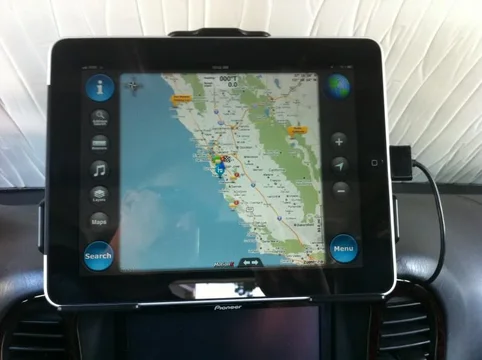
That's actually 16.1... 16.2 coming in a few days. Which adds drag and drop GPX KML data to motion X via iTunes.

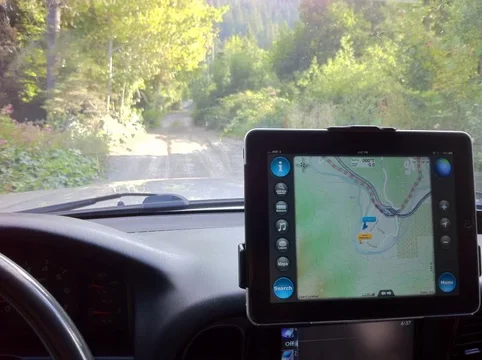
I mentioned the Otterbox Defender case above. That will solve any dust or moisture problems you might encounter. For me I had my iPad mounted in my Audi allroad so no severe 4x4 conditions. Right now I'm in a testing phase in the cruiser to make sure it's something I want in there. I may armor it if needed. First iPad off road excursion next week.

Part of the difficulty of the iOS universe is the quantity of apps. It makes it difficult sometimes to find what you need. Motion X is a quality company and continue to innovate their product. I made contact with them recently on a topic about supporting "iPod Out" mode for the GPS app (like they do for Drive) and they actually hadn't considered off road driving as part of the scope of the product. They are now :)
 
How are you powering your iPad in the rig? And the other nit I have is the relative lack of screen brightness on sunny days when the sun's over or into the screen. OTOH my Lowrance Baja 540C never wants for more screen brightness in the same conditions. Believe me: I wanted to like the iPad!
 
I hardwired an additional 12v socket inside the center stack and have an iPad specific charger plugged into it. I then routed the wire inside to pop out just above the passenger center vent. About 4-5 inches of exposed cable. It's pretty tidy. So far in the cruiser if I have the screen at max bright it's just fine. I adjust to min brightness at night.

IMG_0271.webp

I'm certainly not trying to sell you an iPad :p I've owned many GPS units and had multiple PC GPS setups in various cars and like you I know what I want and like. One of my big nits about dedicated GPS units is they become clunky and outdated with no means of upgrade. Sure you can get the occasional map update but innovation to the unit is static at production. I do like dedicated systems and I have a pioneer head unit nav for daily turn-by-turn but it suffers the same probs as any dedicated unit. To Motion X credit they are on rev 16 in less than 4 years - not because 1.0 sucked but because they keep innovating.

What sells the iPad for me is that it's super quick interface, pinch zoom, infinitely upgradeable software and the pace in which developers add improvements, It makes a great car-puter and I can take it with me and get 10 hours of computer use or 3-4 GPS use.

At the end of the day your lowrance is a fine unit (though the company sucks) and has it's advantages as well. The iPad is fragile out of the box and is very expensive (though the 540 aint cheap) relative to other stand alone solutions, and that may be it's biggest weakness.
IMG_0271.webp
 
Last edited:
This is a great discussion Dan/Rob! It's amazing where technology is going. Whenever I start to think the information revolution has reached a plateau, I realize each advancement just opens the door for even more.

Question for the iPad users: do the various iPod/iPhone vehicle interfaces (be it a USASpec, VAIS, Kenwood, Pioneer, etc) drive the iPad just as they would a phone/pod?
 
This is a great discussion Dan/Rob! It's amazing where technology is going. Whenever I start to think the information revolution has reached a plateau, I realize each advancement just opens the door for even more.

Question for the iPad users: do the various iPod/iPhone vehicle interfaces (be it a USASpec, VAIS, Kenwood, Pioneer, etc) drive the iPad just as they would a phone/pod?

The "iPod-Out" functionality isnt implemented exactly the same on the iPad as iPhone/ipod touch. iOS 5 will close that gap but it's up to the manufacturer to use the right protocols in their hardware for each connected device.

Having said that I can attach my iPad to my pioneer avic and get music and movies out but things like Motion X DriveHD wont show it's video out over the iPod interface.
 
Howdy Folks! Seeing as this thread is almost 3 years old, I wanted to see who had any updates on the GPS/Topo combo. Being as 3 years has passed, I thought perhaps technology may have caught up to the 'ONE SIZE FITS ALL' scenerio for ON/OFF road navigating.

I'd love to find something that suits both purposes and also will allow for the setting of Waypoints on the fly when a new, good trail is rediscovered.

Your input is greatly appreciated!

John :popcorn:

I'm running a ruggedized tablet in a RAM mount, with OziExplorer GPS software + the Backroads Mapbook for BC loaded. Will take pics later and post them :)
 
I have my laptop set up with GPS, but I never take it. Too big, just too much in the cab. Maybe if I were planning a big trip that needed a ton of navigation and I was going solo (so there would be room for the laptop) For a while I was planning on stashing the laptop somewhere and using a remote touchscreen. But this was still way more than I need.

I'm planning on getting a handheld garmin to use. I dont really need directions very often so the small screen will be OK I think. I really just want it for marking POI and having a track log.

This way I can use it hiking, on a motorcycle, and in the car.

right now I'm watching the new ETrex 30, but I think I'll probably snag a 62s next time they go on sale. Reason for garmin is the free maps available, $100 per state seems ridiculous.
 
I tread some more on the Montana last night.

It comes pre-loaded with 1:100K maps that cover the entire US. Additional 1:24K maps that cover different regions are $129. At a min I'd want the West (WA, OR, CA, NV) and South West (UT, CO, AZ, NM).

$660
$130
$130
$920
:eek::eek:

I really don't see that GPS anywhere in my future except the one where I win the lottery.

The Montana is not inexpensive, but the 600 (who needs the camera) can be found for $500 w/o tax and free shipping. If you look around the web you can get maps cheap. The Navagator maps are almost free if a year old, so basically you are paying for the topos.

I am still using a Garmin Quest I bought in '05 which I paid $400 for, and have been living without topo at all. The Montana does road navigation and off-road/topo better than the Oregon. Great combo.

This will be my next toy come pay-day.
 
Phillipe Lille navigation on bord

--------------------------------------------------------------------------------

my navigator is oziexplorer and the pc samsung Q1

I'm interested in what you show there, tell me more about the components please.
 
Back
Top Bottom