



I have a 2000 LX470. I want to listen to the iPhone on the radio and use it the phone hands free. Does anyone have a after market setup that they can recommend?
Navigation
Install the app
How to install the app on iOS
Follow along with the video below to see how to install our site as a web app on your home screen.
Note: This feature may not be available in some browsers.
More options
Style variation
You are using an out of date browser. It may not display this or other websites correctly.
You should upgrade or use an alternative browser.
You should upgrade or use an alternative browser.
iPhone connection
- Thread starter scrappyslexus
- Start date
This site may earn a commission from merchant affiliate
links, including eBay, Amazon, Skimlinks, and others.

I also have an 00 LX with the all-in-one Nakamichi head unit, and researched this recently. If you also have the Nakamichi, there is no standard audio in (ex: CD Changer, Sat Radio, Aux) that can be used to connect the audio from an external source.
Essentially, you have three options:
(1) Rip out the head unit and replace it with a more robust aftermarket option.
(2) Purchased a hacked replacement factory unit from a vendor like Factory Radio Service, Car Factory Radio Services who has reverse engineered the head unit to solder an aux input to the circuit board
(3) Use an FM Modulator
I ended up going with #3, since I plan on eventually replacing my head unit, but didn't want to do it this year. In my experience, most FM Modulators are horrible, but I found a product from iSimple (the IS77 - $48 on Amazon) that you hard wire into your antenna, and it's amazing.
The audio quality from my iPhone is CD quality, and it only took 30 minutes or so to install.
Take a look, and if you decide to go this route, I am happy to share instructions for how I installed it.
Essentially, you have three options:
(1) Rip out the head unit and replace it with a more robust aftermarket option.
(2) Purchased a hacked replacement factory unit from a vendor like Factory Radio Service, Car Factory Radio Services who has reverse engineered the head unit to solder an aux input to the circuit board
(3) Use an FM Modulator
I ended up going with #3, since I plan on eventually replacing my head unit, but didn't want to do it this year. In my experience, most FM Modulators are horrible, but I found a product from iSimple (the IS77 - $48 on Amazon) that you hard wire into your antenna, and it's amazing.
The audio quality from my iPhone is CD quality, and it only took 30 minutes or so to install.
Take a look, and if you decide to go this route, I am happy to share instructions for how I installed it.

Thank you for this, I also plan to eventually replace the nakamichi but in the interim have been searching for a good aux input device. I tried a cheap FM modulater and a cassete tape adapter, both are terrible. I just ordered the is77, hopefully being hardwired will work much better.

there's also the US SPEC adapter peeps have been installing lately in the 100-series - the thread is fairly recent. i don't think it'll do hands-free though since there isn't a mic in the vehicle, but i could be wrong.


This is what I want for the smart phones. Need to figure out how the music gets amplified through the speakers.
Introducing Mimics - Control your iPhone from a Touch Screen - YouTube
Introducing Mimics - Control your iPhone from a Touch Screen - YouTube
I posted up about installing a USA-SPEC BTC-TOY, which adds bluetooth audio streaming and hands free. It works flawlessly. (Kit comes with a microphone, so hands free calling works.)
Their site, usaspec.com does not list a 2000 LX, so I don't know if it supports your radio. I suggest that you call them to see if they have it available.
Install was easy, price is great ($150) and it simply works. Good luck.
Their site, usaspec.com does not list a 2000 LX, so I don't know if it supports your radio. I suggest that you call them to see if they have it available.
Install was easy, price is great ($150) and it simply works. Good luck.
I posted up about installing a USA-SPEC BTC-TOY, which adds bluetooth audio streaming and hands free. It works flawlessly. (Kit comes with a microphone, so hands free calling works.)
Their site, usaspec.com does not list a 2000 LX, so I don't know if it supports your radio. I suggest that you call them to see if they have it available.
Install was easy, price is great ($150) and it simply works. Good luck.
Unless they have changed their products recently, they don't support the 2000 LX w/ Nakamichi. I believe the USA-Spec, and similar products from other manufacturers, require an existing external audio interface (Sat, CD Changer, etc) on your head unit in order to work. The Nakamichi in the '00 is completely self contained (incl. built in changer in dash), so there is no interface to connect it to.
Alpine Electronics of America, Inc.
I installed the 125 bt in my civic:
blue tooth has poor audio quality for music / phone is convenient and to me sounds ok but has annoying echo for the person I'm talking to due to my stereo speakers feeding back into my mic.
iphone music operation is best on the iphone rather than the head unit / head unit iphone interface is a gimmick
i put a 124xm in my 99LC100 and I far prefer sat radio to distracting my driving with song selection / yet lots of input options for music-cd-iphone-USB-1/8"-XM-FM
I generally use the 1/8" input for audio, works well, and guests can plug in androids/tablets and any other device with 1/8"
Fitting a aftermarket stereo to a LX470 requires some research ...
I installed the 125 bt in my civic:
blue tooth has poor audio quality for music / phone is convenient and to me sounds ok but has annoying echo for the person I'm talking to due to my stereo speakers feeding back into my mic.
iphone music operation is best on the iphone rather than the head unit / head unit iphone interface is a gimmick
i put a 124xm in my 99LC100 and I far prefer sat radio to distracting my driving with song selection / yet lots of input options for music-cd-iphone-USB-1/8"-XM-FM
I generally use the 1/8" input for audio, works well, and guests can plug in androids/tablets and any other device with 1/8"
Fitting a aftermarket stereo to a LX470 requires some research ...
Spent about an hour in the garage this morning and the is77 is in and sounds so much better than anything else I've tried plus it charges my phone and has a video out for streaming Netflix in the car for the kids.
Glad it worked out for you!
For future owners who might be interested in this project, here are a couple of suggestions regarding installation, based on what I went through on my LX470. Although this is primarily focused on the 2000 LX470, with Nakamichi all-in-one, it could be used for any vehicle that does not have an external audio input (CD Changer, Satellite, etc). If you do have one of these external ports, you may want to research other options, as discussed previously in the thread. It's been a little while since I installed mine, but here are my notes based on memory.
(1) Getting started
The iSimple IS77 (aka Tranzit) acts as an intermediary between your antenna and your head unit (in this case, the Nakamichi all-in-one). When enabled, it filters out all external broadcasts on a predefined FM channel (87.9), and injects it's own signal from your audio player. This is significantly more effective than the more traditional FM transmitter units you plug into your cigarette lighter, which compete with other nearby broadcasts.
The iSimple kit comes with a bunch of parts that you will want to familiarize yourself with before you get started. I would suggest mapping out where you want to install all of the components prior to opening the dash. There are a lot of possibilities for installation, so get creative. In my case, I wanted the switch out of the way so it didn't interfere with the look of the stock dashboard. I also wanted to make sure the installation was easily reversed in the event that I decide to either sell the vehicle, or install new head unit that comes with iPhone integration.
Here is a crude diagram of how I ended up routing my cables, which I will walk through below:
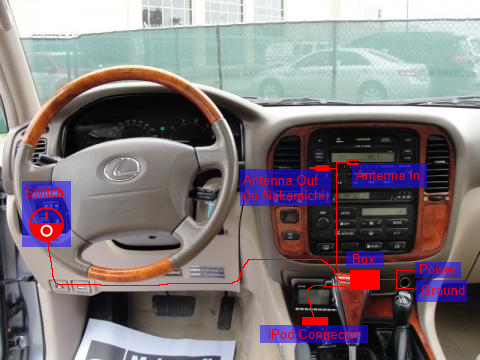
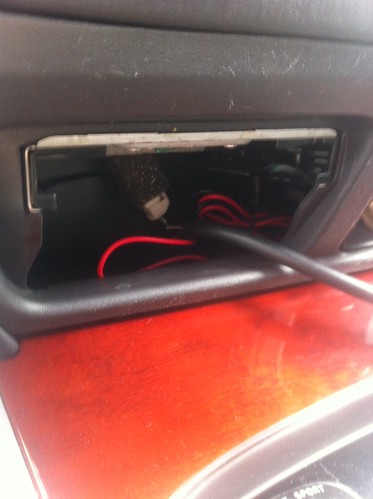
I chose to focus the installation in the cavity behind the ashtray. There is a lot of room back there, and it allowed me to run all of the necessary wires to central location.
My kit came with the components that you see in the photo below:
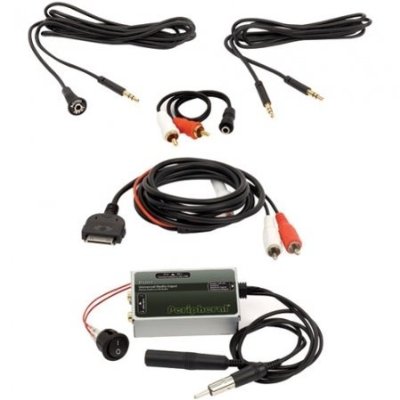
Note: Some instructional videos and documents for other vehicles will suggest that you need antenna adapters to make the iSimple connectors work with your vehicle. For the '00 LX470 Nakamichi, no adapter is needed since the primary retractable antenna connects with the same Motorola-style connector that the iSimple uses.
(2) Removing the trim and accessing the head unit
Note: I made my own simple trim tool out of an old thin galvanized wrench that came with some furniture we bought recently. I bent one end to a bit of a curve to it, essentially making it a mini pry bar. There are also special purpose "Trim tools" that you can buy, if you want to get all fancy. You could also use a screw drive with some electrical tape on the end, if you had to. The important thing here is that ideally you would use a tool with a slight bend, so you can pry and pull with it, and the edges should not be sharp, so you prevent cutting up your dashboard.
(3) Plugging in the Antenna
Note: The IS77 expects a Motorola-style antenna plug, which the main retractable antenna uses. There is a second antenna that uses a different connector, built in to the passenger-side rear window, but I didn't bother messing with that. The system worked well, providing clear sound without disrupting that supplemental antenna.
(4) Wiring for Power
Note: I hope it's obvious that the vehicle should be off at this point. It's up to you whether you want to disconnect the battery. If you don't disconnect the battery, you should at least wait a few minutes after you turn it off for the power to the accessories to be cut off.
T-Tap Connector 16/14 Gauge (3MBTT)
http://www.amazon.com/dp/B001JT72D4/?tag=ihco-20
http://www.autozone.com/autozone/ac...-terminal/_/N-25oe?itemIdentifier=365910_0_0_
Note: The Amazon link is for reference. Keep in mind that this listing is for a 100 pack, and you only need two.
Note: Wait until all the steps below are complete before starting the vehicle, but when you eventually do, it will be obvious whether the correct leads are tapped. Immediately upon starting the vehicle, you may notice that the climate screens and stereo all cut out and go blank. If this happens, the fuse for the console was blown from having the leads reversed.
To fix it, you will need to do two things:
Example: 15 Amp Fuse (VP-ATM-15ID)
http://www.amazon.com/dp/B004IS9X5S/?tag=ihco-20
(5) Where to put the On/Off switch
Here is my install for reference:
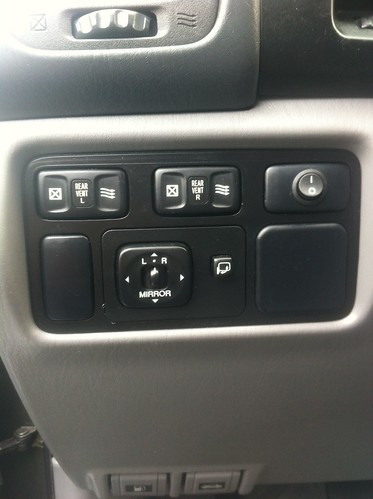
Note: As a side note, the switch appears to only control the FM broadcasting. My phone still charges when the switch is disabled, which is nice. Since it only blocks 87.9, I just leave the switch on all the time.
(6) Where to run the audio connection cable (ex: iPod/iPhone Cable)
Bluetooth Remote
http://www.amazon.com/dp/B00824948U/?tag=ihco-20
iPod 30pin to Bluetooth Converter
http://www.amazon.com/dp/B007ND7XKW/?tag=ihco-20
(7) Testing the IS77
Note: Seriously, before you test the iSimple, put some thought to what your first song is going to be. This truly is a special occasion Some of my favorites: "Tequila makes her clothes fall off" (Joe Nichols), "Back in Black" (AC/DC), or pretty much anything from Sublime.
Note: In regards to charging, every once in a while, my iPhone displays a warning that it cannot charge from the iSimple. When I disconnect / reconnect it, I have found it often will forget about the warning and start charging. Not sure what causes this?
(8) In closing...
Good luck with the install.
(1) Getting started
The iSimple IS77 (aka Tranzit) acts as an intermediary between your antenna and your head unit (in this case, the Nakamichi all-in-one). When enabled, it filters out all external broadcasts on a predefined FM channel (87.9), and injects it's own signal from your audio player. This is significantly more effective than the more traditional FM transmitter units you plug into your cigarette lighter, which compete with other nearby broadcasts.
The iSimple kit comes with a bunch of parts that you will want to familiarize yourself with before you get started. I would suggest mapping out where you want to install all of the components prior to opening the dash. There are a lot of possibilities for installation, so get creative. In my case, I wanted the switch out of the way so it didn't interfere with the look of the stock dashboard. I also wanted to make sure the installation was easily reversed in the event that I decide to either sell the vehicle, or install new head unit that comes with iPhone integration.
Here is a crude diagram of how I ended up routing my cables, which I will walk through below:
I chose to focus the installation in the cavity behind the ashtray. There is a lot of room back there, and it allowed me to run all of the necessary wires to central location.
My kit came with the components that you see in the photo below:
- Main control box, with Antenna harness (Motorola Male and Female connectors), and Power / Ground wires.
- Enable / Disable Switch
- Composite Audio cable (Red / White connector)
- 3.5 mm headphone jack, with extension cable
- iPod cable with 30-pin iPod dock connector
Note: Some instructional videos and documents for other vehicles will suggest that you need antenna adapters to make the iSimple connectors work with your vehicle. For the '00 LX470 Nakamichi, no adapter is needed since the primary retractable antenna connects with the same Motorola-style connector that the iSimple uses.
(2) Removing the trim and accessing the head unit
Note: I made my own simple trim tool out of an old thin galvanized wrench that came with some furniture we bought recently. I bent one end to a bit of a curve to it, essentially making it a mini pry bar. There are also special purpose "Trim tools" that you can buy, if you want to get all fancy. You could also use a screw drive with some electrical tape on the end, if you had to. The important thing here is that ideally you would use a tool with a slight bend, so you can pry and pull with it, and the edges should not be sharp, so you prevent cutting up your dashboard.
- Once you have your plan together, you need to open up the dash. The good news is that the trim on the LX is pretty simple to remove.
- Looking at the dashboard diagram above, you will need to pry between the molded dashboard piece and the wood trim. Pry slowly around the edges, and you will find that it starts unclipping.
- IIRC, the climate controls are connected to the trim, but there are obvious connectors on the back that you can unclip and place the facade out of harms way. (some place it's not going to get scratched up)
- As I noted in my dashboard diagram, I placed the main control box behind the ashtray and cigarette / power recepticle. To remove this piece,you can follow a similar approach of gently using your trim tool to pry our the edges of the facade until it separates. I started by opening the top clips, and then tugged from the top, while inserting the trim tool under the bottom seam, to release the bottom clips.
- Now, back to the head unit. With the trim removed, you will see a handful of screws (Philips, IIRC) that you can unsrew to remove the Nakamichi.
- After you remove the screws, you will notice that the head unit has two small metal prongs that rest inside the metal frame. If you slightly lift the head unit, it will pull straight out at you.
(3) Plugging in the Antenna
- With the head unit removed, you can start snaking cables.
- First, feed the antenna Male / Female harness up behind the ashtray facade and out from behind the Nakamichi.
- Now that you can see the connections on the back of the Nakamichi, there should be a single round black antenna connector that easily pulls out of the head unit.
- You want to insert this into the female end of the iSimple antenna harness, and then plug the male end into the head unit.
- At this point, you can return the Nakamichi back to it's original seating, and reinstall the wood trim. Everything else you do will be focused on the main box behind the ashtray facade. Don't forget to reconnect the climate control cables!
Note: The IS77 expects a Motorola-style antenna plug, which the main retractable antenna uses. There is a second antenna that uses a different connector, built in to the passenger-side rear window, but I didn't bother messing with that. The system worked well, providing clear sound without disrupting that supplemental antenna.
(4) Wiring for Power
Note: I hope it's obvious that the vehicle should be off at this point. It's up to you whether you want to disconnect the battery. If you don't disconnect the battery, you should at least wait a few minutes after you turn it off for the power to the accessories to be cut off.
- The iSimple needs to be connected to a 12v power source. Since I was already stashing my iSimple control box behind the ashtray, I decided to tap it into the cigarette adapter.
- There are number of different ways to tap into a power source like this, but the easiest is to purchase taps from an auto parts store. I used the following:
T-Tap Connector 16/14 Gauge (3MBTT)
http://www.amazon.com/dp/B001JT72D4/?tag=ihco-20
http://www.autozone.com/autozone/ac...-terminal/_/N-25oe?itemIdentifier=365910_0_0_
Note: The Amazon link is for reference. Keep in mind that this listing is for a 100 pack, and you only need two.
- The taps work on a simple concept. You place the two wires that you want to splice together inside the cradle, and then snap it closed. The metal teeth inside cut through both cables and power now flows to both connections.
- Make sure that if there is any iSimple tail sticking out from the taps, that you trim them back. If you leave the wires's copper exposed, it may cause a short if it touches another part of the vehicle.
- So, which wires should you tap? Look on the back of the cigarette lighter recepticle and you will see two wires: One solid grey and one grey / white striped. One is the power and one is the ground.
- I can't remember which color is which, but if it isn't obvious to you, don't worry. If you accidentally reverse them, you can fix it later. Perhaps someone can respond below with the correct leads?
Note: Wait until all the steps below are complete before starting the vehicle, but when you eventually do, it will be obvious whether the correct leads are tapped. Immediately upon starting the vehicle, you may notice that the climate screens and stereo all cut out and go blank. If this happens, the fuse for the console was blown from having the leads reversed.
To fix it, you will need to do two things:
- First, switch the taps, so they are on the opposite leads.
- Second, you will need to replace the 15 AMP "CIGAR" fuse in the Driver's side footwell. Look for the black fuse box with a diagram of the fuses. The diagram will show you the position of the fuse within the box. Remove it, and examine it. If you tripped it, it will look blown.
Example: 15 Amp Fuse (VP-ATM-15ID)
http://www.amazon.com/dp/B004IS9X5S/?tag=ihco-20
- When you restart the vehicle, the climate and stereo displays should function again, which is a good sign that you got the power leads tapped correctly.
(5) Where to put the On/Off switch
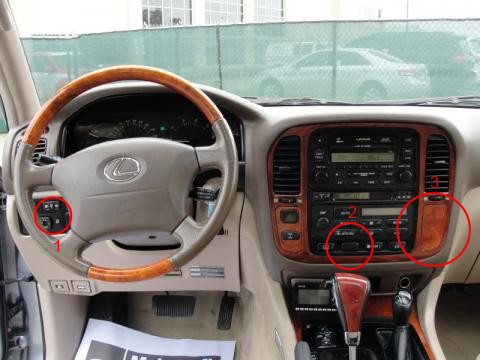
- There are a lot of options for where to put the switch. You may want to avoid trying to install the switch in the blank within your climate control area of your dash (#2 below). Although tempting, this blank is only possible to get to if you separate the circuit boards adhered to the back of the climate control unit. Lots of little parts in there that could result in bad Joo Joo. I have also seen a few people install controls in the blank wood panel on the passenger side of the climate controls (spot #3). I chose to go with spot #1, since the switch didn't match the rest of the dashboard, and I didn't want to look at it all the time. If you don't really care about how it looks, I have also seen people stash the coiled up switch and wire in their ash tray. Don't worry, I won't judge.
- My suggestion is to consider mounting it in one of the blanks on the left side of steering wheel, by the mirror control. If you screw up the blank, they are easy to replace. It also means that it's easier to revers your work later, if you decide to update your head unit in the future, removing the need for the iSimple.
Here is my install for reference:
- If you want to go with the blank like I did, it's very easy to remove by inserting your trim tool, or a flat head screw driver, into one edge of the blank and pulling out.
- Arts and crafts time! Using a drill or a Dremel multi-tool, make a whole in the center of the blank that matches the diameter of the switch body, so it fits snugly into the blank.
- Once you are happy with your creation, feed the wires from the back of the switch down through the dashboard opening where blank was, into the driver's side foot well.
- Return the blank / switch, to close the opening, and check that the switch toggles to your liking.
- Run the remainder of the switch's wire across the footwell, and up into an opening on the side of the dashboard. You should be able to easily feed it up into the cavity behind the ashtray, and connect it to the main iSimple box.
- Using a couple of zip ties, anchor the loose cable to fixed points above the foot well, so the wire is not loose, and you don't have to look at it.
Note: As a side note, the switch appears to only control the FM broadcasting. My phone still charges when the switch is disabled, which is nice. Since it only blocks 87.9, I just leave the switch on all the time.
(6) Where to run the audio connection cable (ex: iPod/iPhone Cable)
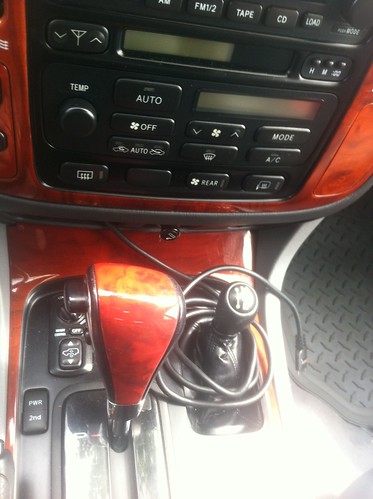
- Turns out that you can only use one of the audio input cables that they include. If you elect to use the 3.5mm headphone-style input, that's fine, but keep in mind that it will not charge your device.
- From the beginning, I have planned to turn my ashtray into a doc for my iPhone. (still finishing that project)
- Until I finish fabricating the dock, I went ahead and ran the iSimple iPod cable through the opening for the ash tray, and wrapped it around the 4WD shifter:
- You could run this any number of places, including the center console, glove box, or under the driver's side seat...
- Also, somewhat related, if you do a lot of tail-gating, and you want to be able to control the music remotely, you might consider picking up one of these Bluetooth remotes for the iPhone / iPad / iPod Touch:
Bluetooth Remote
http://www.amazon.com/dp/B00824948U/?tag=ihco-20
- And, if you occasionally find yourself wanting to make the iSimple connection wireless / bluetooth, so you don't have to mess with the cable, you could try picking up a 30-pin to Bluetooth connector, like this one:
iPod 30pin to Bluetooth Converter
http://www.amazon.com/dp/B007ND7XKW/?tag=ihco-20
(7) Testing the IS77
Note: Seriously, before you test the iSimple, put some thought to what your first song is going to be. This truly is a special occasion Some of my favorites: "Tequila makes her clothes fall off" (Joe Nichols), "Back in Black" (AC/DC), or pretty much anything from Sublime.
- At this point, before you button up the dashboard, you should start the vehicle and make sure everything works correctly.
- Reconnect the battery, if you chose to disconnect it.
- If, after starting the vehicle, the display on the climate controls and stereo do not come on, see the notes in the "Wiring for Power" section above, since you may have reversed the taps.
- If all looks good on the dashboard, switch the iSimple power to on, and check that the dashboard displays still have power.
- To test the iSimple, turn on your Nakamichi, and tune it to FM Channel 87.9. Toggle the iSimple power switch that you installed. When turned on, you should hear nothing. When turned off, you should either hear static, or whatever local channel is broadcasting on 87.9.
- Finally, plug in your audio device (iPod / iPhone) to the audio cable you installed, and play something. If it's an iDevice, you should see that it is charging, and be able to hear the music through your Nakamichi sound system.
Note: In regards to charging, every once in a while, my iPhone displays a warning that it cannot charge from the iSimple. When I disconnect / reconnect it, I have found it often will forget about the warning and start charging. Not sure what causes this?
(8) In closing...
- Did this work for you?
- Did you do something different that worked out for you?
- If so, post pictures and let me know!
- And yes, I am aware that documenting this gets us one step closer to finally shutting down the Geek Squad.

Good luck with the install.

That is one helluva writeup! Great job!
I am thinking about this IS77 and just found this thread. Thank you for contributing. It answers a lot of questions.
I am thinking about this IS77 and just found this thread. Thank you for contributing. It answers a lot of questions.
Thank you. I hope it helps you out. IMHO, this is a required project for anyone with a 2000 LX470, unless you want to rip out your head unit.
Let me know how your install goes.
Let me know how your install goes.
X2 I couldn't be happier with mine, and I can put off the $1500 custom audio setup until I "need" it.

Just successfully performed the install this afternoon - thanks for the guidance!! I did toast a fuse along the way, reinstalled and now non driver-side windows stopped working. I started the install working from the aux power on the dash and picked the wrong wire - toasted fuse. Attempted the cigarette lighter and had the lines wrong - toasted fuse. Stereo quit working at that point and the lights on the climate control went out, despite the unit still functioning. Noticed on a run to the parts store that the non-driver side windows stopped working. Replaced all the blown fuses and everything returned to normal - except the windows. Does anyone have any other suggestions as to what could be causing the window failure? I'm praying for dry weather
Checked all other fuses - no issues
Unhooked battery and cleaned terminals - no issues
FYI - the positive line is the grey wire out of the cigarette lighter if anyone is curious about the install directions.
Checked all other fuses - no issues
Unhooked battery and cleaned terminals - no issues
FYI - the positive line is the grey wire out of the cigarette lighter if anyone is curious about the install directions.

Anyone test this out with a iPhone 5/5S?

The 5/5s still take the standard jack. You won't be able to charge it directly through the unit, but you can always add power through the second cig port.
Be prepared for a proprietary jack from Apple soon though.
Be prepared for a proprietary jack from Apple soon though.

- Joined
- Jan 4, 2014
- Threads
- 94
- Messages
- 3,042
- Location
- Little Rock, Arkansas
- Website
- www.facebook.com
Any differences between this install on a LC compared to your LX that you are aware of?

If you're radio antenna is broken, will installing the isimple affect it in any way?
No, your antenna will still be broken.

But if what you mean by "broken" is that the aerial is broken or the motor doesn't extend the aerial, then that should not effect how the iSimple operates. The iSimple plugs into the back of the head unit into the antenna (female) jack, and then the antenna jack (male) plugs into (i.e on top of) the iSimple plug.