Android free app with offline maps and breadcrumbs?

This site may earn a commission from merchant affiliate
links, including eBay, Amazon, Skimlinks, and others.

e9999

Gotta get out there...
Moderator
Joined
Sep 20, 2003
Threads
1,087
Messages
19,241
Location
US
Looking for the above. I have to have the ability to use maps saved earlier if i'm offline in the boonies and i'd like real time breadcrumbs showing right away on the map so i can backtrack easily. Both google maps and navfree are good for offline maps but neither give breadcrumbs. Google Tracks will record a track but it does not show instantly on map, you have to save and import, a pain. Bonus if the app does guidance when offline like Navfree does and may accept topos. And, yes, i'm open to paid apps later if worth it, but want to check free ones first to experiment with and find their limitations.
 
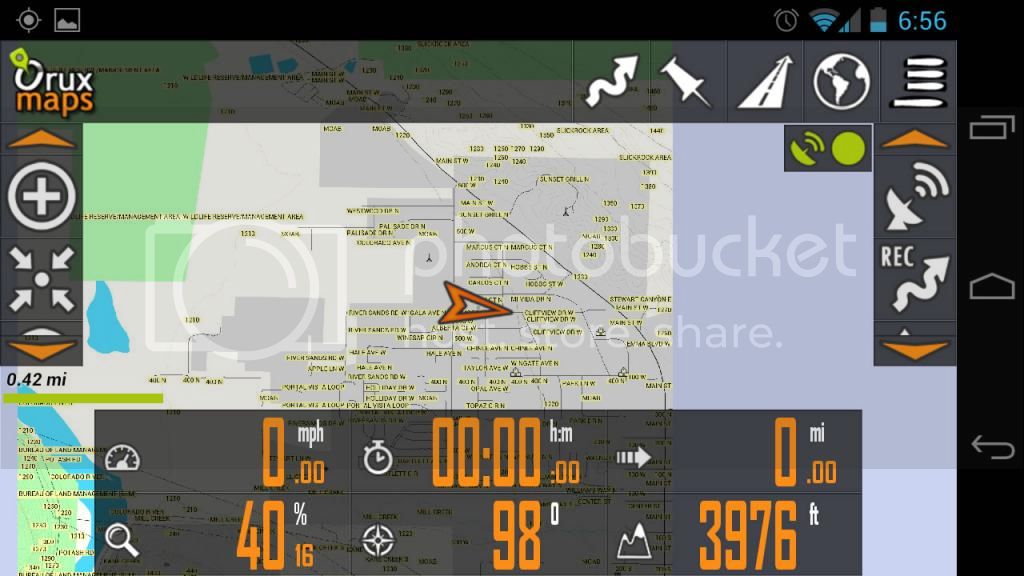
Oruxmaps. Its free and pretty awesome. Uses downloadable free maps, or you can load all the free garmin maps that are available.

screenshot from my galaxy nexus, all the menus that are up can disappear when not in use. I just have them up to show them.

Screenshot4_zps4f79a645.jpg
 
If you're "in the boonies" then you need topo maps or similar high res maps, NOT street maps.

I'm happy with Oziexplorer (android version), but then I've run the desktop for many years, so already have maps ready for the android version.

In the US you can download free 24k USGS topo maps that are pretty decent for free.

I run oziexplorer android and I also pre-cache areas of interest in google earth and then use those for high res aerial imagery. I can run both programs at once (switch from one to the other) under Android.

I also use google maps and pre-cache street map level stuff of areas I'll be in, just in case the street stuff is easier to use while on the main roads that are shown.

I'm sure folk have other favourites that they run, but for my purposes the setup above works great.

I run these on an Acer A100 (7" tablet) that has built in GPS (works fantastic) and microsd slot. With a 12V adapter it makes for a great vehicle GPS.

mqdash.jpg


cheers,
george.
 
I will look at oruxmaps, thanks. It does have crumbs, right?

George, i know you like ozie. I didn't think it would have a free version, though. Not seeing one on Google Play Store.
 
Last edited:
You can download a free trial - just go to the ozi website.

cheers,
george.
 
I will look at oruxmaps, thanks. It does have crumbs, right?

Yes, it records tracks, then will convert them to routes also. It will also make waypoints, geotag pics, etc. You can also export the tracks to different formats for google earth or others.

Using the garmin topo maps, the entire state of Utah only takes up 150 mb
 
Last edited:
Yes, it records tracks, then will convert them to routes also. It will also make waypoints, geotag pics, etc. You can also export the tracks to different formats for google earth or others.

Using the garmin topo maps, the entire state of Utah only takes up 150 mb


great. where did you get the maps? Forgot where I got mine.
 
Last edited:
You can download a free trial - just go to the ozi website.

cheers,
george.


nice, will look. thanks.
It does state that the Trial version will not save tracks, but I'll try to give it a shot.
 
Last edited:
Garmin maps here http://www.gpsfiledepot.com

to use them you need to create a new folder under oruxmaps - mapfiles -
then load only the .img files that are in the download from gpsfiledepot

a lot of other free downloadable ones are accessed through the app

There are a couple topo maps in the built-in app list already. Will start with USGS.
 
Last edited:
Ya, the usgs topo's are good. But to download all the zoom levels will be a pretty huge file.

Likely. But even the Google street maps, when going down to level 16 or so, was already a big download for my little area. Seems like this Orux app is not the most efficient at creating maps. But enjoying playing with it.

When you used the garmin maps, were you still able to use the driving directions with them? Even the topo ones?
 
I dont think any of the apps are effiient that use raster type maps. Its basically every tile and zoom level is another image to save. With the garmin maps, they are vector based which are infinitely scale-able with the same data.

For directions, I've never actually tried following a route. but I dont think it would give turn by turn directions. I'm not sure any of the topo type apps would do that. They aren't programmed to know when a turn option is coming up as far as I know.

Where are you at? PRK?
 
I dont think any of the apps are effiient that use raster type maps. Its basically every tile and zoom level is another image to save. With the garmin maps, they are vector based which are infinitely scale-able with the same data.

For directions, I've never actually tried following a route. but I dont think it would give turn by turn directions. I'm not sure any of the topo type apps would do that. They aren't programmed to know when a turn option is coming up as far as I know.

Where are you at? PRK?


yes, PRK. I did download some USGS topo maps for my area directly in Orux. I suspect those may be the 24K cuz they are missing the highest resolution levels (16 and 17 IIRC). To my surprise, it did indeed give road directions with these maps. That was impressive. It's possible though that it was using some google street maps I have on too, but it did show the directions directly on the topo map.

I have to look back at the Garmin maps. I downloaded those on my handheld GPS back when but it was a bit of a pain IIRC. When you use them in Orux, did they stay vectorial?
 
Puerto Rico?

Crazy about the turn by turn. I'll have to give that a try, but its a feature I never use.

For the garmin maps, I do it through my computer, then move it to the phone.
 
Puerto Rico?

Crazy about the turn by turn. I'll have to give that a try, but its a feature I never use.

For the garmin maps, I do it through my computer, then move it to the phone.

no, Kalifornia.

well, I'd like to use the same app for both in-town directions and possibly topos for out there. Although in truth, I don't feel like topos are a big must if I have a map that shows most of the dirt roads as quite a few of the non-topo do already. But breadcrumbs I really like to have for offroading in unknown areas.
 
Ahh, got it:D


For in town turn by turn, dont you have the stock android navigation app?


yes, but I prefer Navfree cuz that one can do guidance while offline whereas google maps can't apparently (although I've read rumors that if you start out the guidance process while online it will continue while offline but don't know yet if true).

but as I said, I'd like breadcrumbs and don't want to run more than one app if possible at all to save memory space. And I don't think that Navfree can save maps to external SD. Seems like Orux can.

Added: Wow! This orux app is very impressive. And yes, you can save the maps to an external card. Helps a lot given how big these raster maps are. Having some trouble saving tracks though.
 
Last edited:
Garmin maps here http://www.gpsfiledepot.com

to use them you need to create a new folder under oruxmaps - mapfiles -
then load only the .img files that are in the download from gpsfiledepot

a lot of other free downloadable ones are accessed through the app

So, how are you downloading these? I got there but not obvious how to for orux. Do you have to do this with Mapsource?
 
Back
Top Bottom