Just finished putting the Jesen with cd and i-pod hook up in my daughters fj62. Wiring easy,fitting radio took a little bit of thought,now it would take me about 1-2 hours. WE love it sounds great,looks retro and I dont think a thief would give it a second thought. Mike
Navigation
Install the app
How to install the app on iOS
Follow along with the video below to see how to install our site as a web app on your home screen.
Note: This feature may not be available in some browsers.
More options
Style variation
You are using an out of date browser. It may not display this or other websites correctly.
You should upgrade or use an alternative browser.
You should upgrade or use an alternative browser.
Found the PERFECT aftermarket stereo for the 60
- Thread starter ProwlerDriver
- Start date
This site may earn a commission from merchant affiliate
links, including eBay, Amazon, Skimlinks, and others.


They have now said that the new radio, with USB, should be available in March/April. It will likely be called the JHD3620.
From a post on http://www.heavydutyradios.com/jhd_3510.html the JHD3620 will be available February 26th.
Ex
Last edited:

Check to see how much room you have between radio face and lid if you use a CCOT or Tuffy console to house the stereo. I just ordered a down angle USB Male Female connector that is low profile once plugged in so I dont have to worry about accidently shutting lid in dark or having someones elbow snap off the jump drive on the trail while it is inserted.
USB 2.0 Extension Cable (Right Angle) - GOLD SERIES
Here is what I am putting in mine so I can just plug jump drive into this dongle and close lid and not worry about it being snapped off.
USB 2.0 Extension Cable (Right Angle) - GOLD SERIES
Here is what I am putting in mine so I can just plug jump drive into this dongle and close lid and not worry about it being snapped off.
Thought I might chime in just for sng's since folks seem to like the usb options. I just installed one of these in my rig after rather poorly bending up a 16 guage din mount. (should have just gotten the dang H.F. metal brake.) Anyway - nice little unit - usb & audio in from the front panel - detach the panel to insert an ipod or sd card. I opted for the no cd option - has bluetooth for file transfer and phone:


$140 or so off Amazon. Boss 765 DBI

$140 or so off Amazon. Boss 765 DBI
that is cool

...I just ordered a down angle USB Male Female connector...
Excellent! Thanks for that find...AND you can get it in either orientation so you don't run the risk of having the angle point UP!
YEP...just make sure to see what side the thick plastic part is on your USB recepter so you have it angle the correct direction....or down.
For my CCOT I need it to angle to left as to right would get in way of lid when closing and down did not appear to give me as much clearance as the left down angle setup.
took me a long time to find the right cables...will have this week and will post pic of it installed and give report if it was low profile enough or I wasted my money. LOL
For my CCOT I need it to angle to left as to right would get in way of lid when closing and down did not appear to give me as much clearance as the left down angle setup.
took me a long time to find the right cables...will have this week and will post pic of it installed and give report if it was low profile enough or I wasted my money. LOL
New Jensen
It's here. Good service and price from Heavy Duty Radio / Skid Steer Radio / ATV Radio / Moped / Lawn Tractor Radio / Semi Truck Radio
EDIT: I found the Ipod cable (model # JIPDCBL12) at www.defender.com for only $16.99 (however they have a $25 minimum order) and the remote at www.crutchfield.com for $9.99 The cheapest by far that I have found.
Ex

It's here. Good service and price from Heavy Duty Radio / Skid Steer Radio / ATV Radio / Moped / Lawn Tractor Radio / Semi Truck Radio
EDIT: I found the Ipod cable (model # JIPDCBL12) at www.defender.com for only $16.99 (however they have a $25 minimum order) and the remote at www.crutchfield.com for $9.99 The cheapest by far that I have found.
Ex
Last edited:

anyone have the exact mesrmnts for the fj62 radio area - i want to put in a ddinn navi but only one w a removable face plate...

You should be able to measure off your stock unit?
I've found the trickiest part of getting things to fit is if your faceplate is motorized in any way. I mounted my single DIN JVC on the bottom half because it would hit the dash lip while transforming.
I've found the trickiest part of getting things to fit is if your faceplate is motorized in any way. I mounted my single DIN JVC on the bottom half because it would hit the dash lip while transforming.
I run a notepad Computer with GPS / Sat radio / Internet/extranet/undernet so i've got a computer for all of the has-beans..
The sound is from a Logitech sound system 5.1 surround system.
This is tucked away and hidden ..
This system will be setup in the cruiser, will be the same as the 745 dog car.
VT
The sound is from a Logitech sound system 5.1 surround system.
This is tucked away and hidden ..
This system will be setup in the cruiser, will be the same as the 745 dog car.
VT
Last edited:

Finally got my Ipod cable installed.
The controls on the radio for the ipod are pretty straight forward and the best part is that the same cable charges the ipod. Tucked away on the tuffy I forget is there ready to take on the go..
I got the 1' cable.
Kind of on the short side but it was that or buy the 5 footer...
The controls on the radio for the ipod are pretty straight forward and the best part is that the same cable charges the ipod. Tucked away on the tuffy I forget is there ready to take on the go..
I got the 1' cable.
Kind of on the short side but it was that or buy the 5 footer...
Finally got my Ipod cable installed.
The controls on the radio for the ipod are pretty straight forward and the best part is that the same cable charges the ipod. Tucked away on the tuffy I forget is there ready to take on the go..
I got the 1' cable.
Kind of on the short side but it was that or buy the 5 footer...
Can you take snaps of the screens? I am very curious as to the process for browsing folders/artists/playlists etc on the ipod...
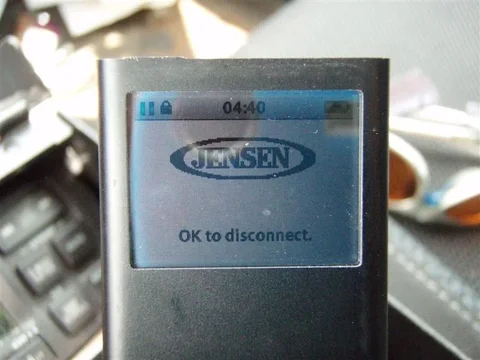
The ipod itself has a Jensen logo on the screen..and will not let you sarch or do anything for that matter on its screen.
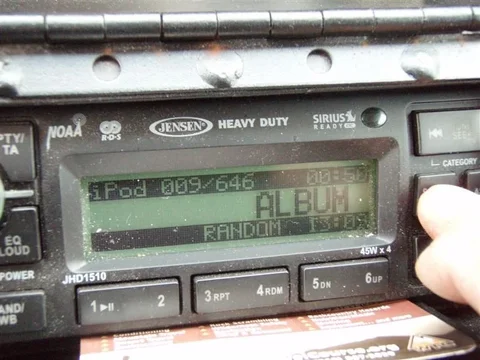
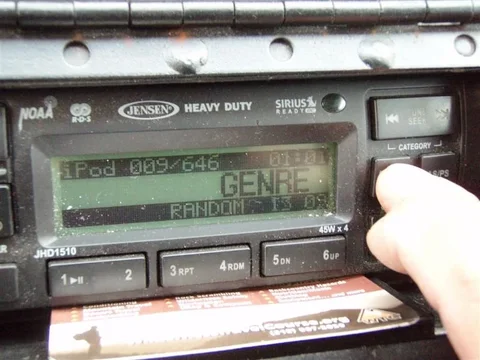
All the info appears on the face of the deck depending on what button you press and what and how you got your folders set up on the ipod...
It took me about 2 min (without reading the instructions) to figure out how to navigate through my IPOD...
All the info appears on the face of the deck depending on what button you press and what and how you got your folders set up on the ipod...
It took me about 2 min (without reading the instructions) to figure out how to navigate through my IPOD...
It's the head unit's screens I'd like to see when they display the iPod info...
Other units I have used with an iPod fall WAY short of a good interface... I'm hoping this is better.
Other units I have used with an iPod fall WAY short of a good interface... I'm hoping this is better.