



I finally bought a mobile ham radio for my rig last week and had been struggling with where to mount it. I wanted it in a place that was easy to see and touch but wasn't in the way and wouldn't provide more clutter. I looked at the dash and thought that the cassette deck was in about the perfect spot and it met my requirements. I held up the face plate (Yaesu FTM-400XDM) and loved it.
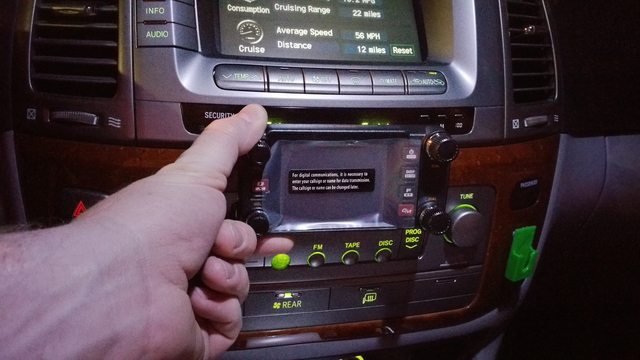
I looked around online for mounts that used the tape deck opening and found that there were several out there but I wasn't confident that they would hold up well and not rattle or fall out while wheeling. I found some time on Friday and started to rip apart my dash to see what was inside the cassette deck.
I pulled the wood trim ring, the two vents, then the screws that hold in the main assembly. On each side of the big console there are brackets that keep the three main parts together, the nav unit, the cassette deck, and the lower 4 button panel. By removing the 4 black screws from the bracket (2 each side) and the 2 pointy silver screws (access from the back) that hold the nav and cassette assembly together you can slide the cassette deck out. Obviously you have to unplug the connections on the back and there are a couple tabs on the bottom side of the cassette deck that pop off as well. This part was super easy.
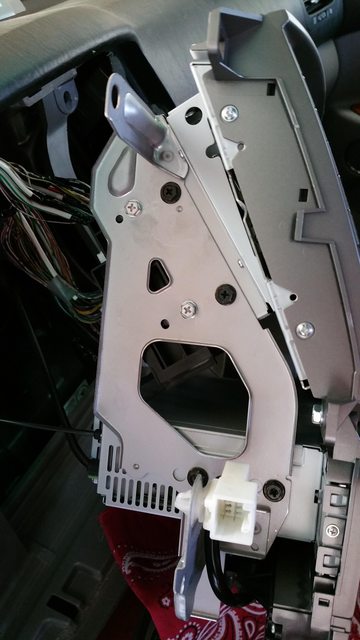
With the whole cassette deck removed from the dash you can start to dis-assemble the deck. There are two more tiny screws on the sides that hold the front plastic panel to the body along with a couple tabs. Pop those out/off and this is what you see.
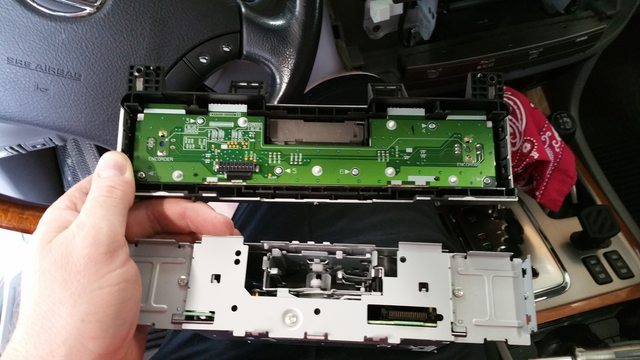
Then I removed the top of the case and got really excited.

I found that the cassette portion of the assembly was mounted to the case with four standoffs and that it had its own circuit board. The red dots in the picture above are the standoffs and the arrows point to the data/power connectors from the cassette to the main circuit board. The connectors just slide apart and are a compression fit, when things are lined up they just connect.
The awesome part about how the cassette integrates with the base circuit board is that since it has its own electronics you should be able to remove it without adverse affects to any of the other functions. I hastily put the face back on and ran outside to test that my theory was correct and found that it was. With the cassette removed I was able to still operate the other radio functions including switching between FM/SAT and volume and tuner nobs still worked as well.
Here is one more picture of the bare circuit board with the front plate removed.
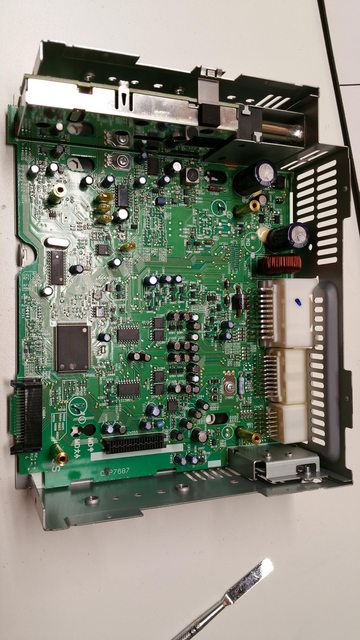
The awesome thing about the standoffs is that you can build a plate mounted to them and add whatever you want from there. That was my goal. I'm an unaccomplished and unskilled electronics nerd and have had a 3D printer since Christmas so my first thought was to do some modeling and print a bracket. I have no experience with CAD though so a couple attempts I started with crashed and burned and I gave up.
Plan B was to use scrap metal and fire to accomplish my goal. It went much faster and after just a short amount of time I had a bracket, riser, and platform built, burnt, and painted to match the color of the sliders I just installed.
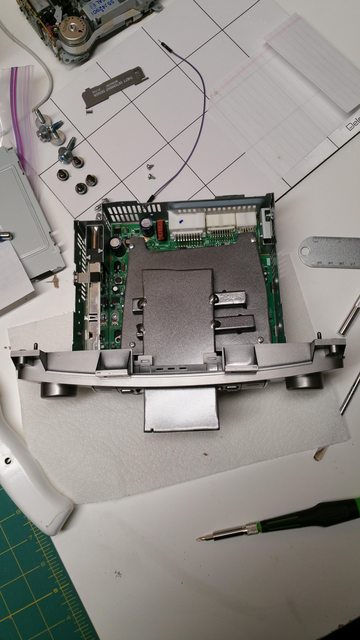
The scrap I used was way thicker than it needed to be but it will be fine. I roughed the base plate with cardboard before tracing it (poorly) to the scrap. Then I used a cutoff wheel on my grinder to cut that out and drilled holes for the standoffs. I used 1/2" square to make up the distance so the top platform would clear the slot. I tacked that all together and did a test fit to ensure I hadn't screwed up anything too bad and was pleased with how it was centered.
Here is another angle... you can see where I broke out a couple of slats so I could fish a wire through the back and have it hidden. I probably should have filed it down or put a grommet in there to protect the wire but, I didn't.
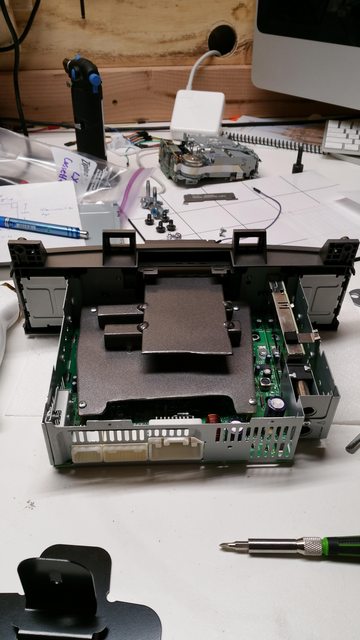
Here is everything buttoned back together. The phone looking wire is the only required connection to the face plate. The platform sticks out about 1.5" from the slot.
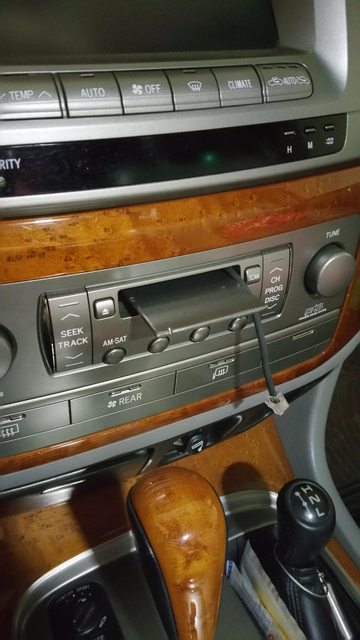
If you have an attention to detail (I'll apologize now for how bad this all is) you will notice that in the before pictures I was missing the AM-SAT button and it is there in the after picture. When I bought my LX a year ago the button was gone. I FOUND IT WHILE DOING THIS INSTALL under the driver seat. It had been driving me nuts and there wasn't a part number for it so I couldn't replace it. Finding that stupid little button alone was worth doing this whole project in itself.
And finally here is a picture with the face plate sitting on the platform. The temp and time are partially blocked from view and you can't see the labels for the radio buttons now but I'm very pleased with the fact this was even possible. If it wasn't for the standoffs I would have likely given up and mounted it the worst way possible, via suction cup to the windshield. (not really, I'd never do that)
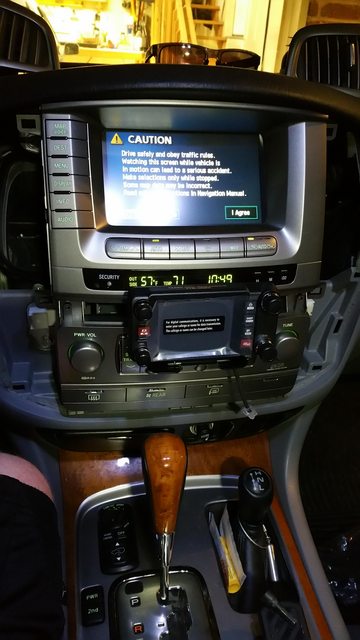
I still need to finish the rest of the ham radio install which is why the face plate isn't powered on. I've got to make some extension cables for the face plate and mic since it looks like I'm going to have to install the body in the rear passenger compartment. I've ran power already but haven't connected it still. I'm hoping to have that done tonight.
I'll probably tinker with how the face plate is installed to the platform still but I need to get some projects wrapped up for cruise moab before I can play too much with that. I think a RAM mount could be ideal but will need to look closer before I decide.
Hope this helps someone out there.
I looked around online for mounts that used the tape deck opening and found that there were several out there but I wasn't confident that they would hold up well and not rattle or fall out while wheeling. I found some time on Friday and started to rip apart my dash to see what was inside the cassette deck.
I pulled the wood trim ring, the two vents, then the screws that hold in the main assembly. On each side of the big console there are brackets that keep the three main parts together, the nav unit, the cassette deck, and the lower 4 button panel. By removing the 4 black screws from the bracket (2 each side) and the 2 pointy silver screws (access from the back) that hold the nav and cassette assembly together you can slide the cassette deck out. Obviously you have to unplug the connections on the back and there are a couple tabs on the bottom side of the cassette deck that pop off as well. This part was super easy.
With the whole cassette deck removed from the dash you can start to dis-assemble the deck. There are two more tiny screws on the sides that hold the front plastic panel to the body along with a couple tabs. Pop those out/off and this is what you see.
Then I removed the top of the case and got really excited.
I found that the cassette portion of the assembly was mounted to the case with four standoffs and that it had its own circuit board. The red dots in the picture above are the standoffs and the arrows point to the data/power connectors from the cassette to the main circuit board. The connectors just slide apart and are a compression fit, when things are lined up they just connect.
The awesome part about how the cassette integrates with the base circuit board is that since it has its own electronics you should be able to remove it without adverse affects to any of the other functions. I hastily put the face back on and ran outside to test that my theory was correct and found that it was. With the cassette removed I was able to still operate the other radio functions including switching between FM/SAT and volume and tuner nobs still worked as well.
Here is one more picture of the bare circuit board with the front plate removed.
The awesome thing about the standoffs is that you can build a plate mounted to them and add whatever you want from there. That was my goal. I'm an unaccomplished and unskilled electronics nerd and have had a 3D printer since Christmas so my first thought was to do some modeling and print a bracket. I have no experience with CAD though so a couple attempts I started with crashed and burned and I gave up.
Plan B was to use scrap metal and fire to accomplish my goal. It went much faster and after just a short amount of time I had a bracket, riser, and platform built, burnt, and painted to match the color of the sliders I just installed.
The scrap I used was way thicker than it needed to be but it will be fine. I roughed the base plate with cardboard before tracing it (poorly) to the scrap. Then I used a cutoff wheel on my grinder to cut that out and drilled holes for the standoffs. I used 1/2" square to make up the distance so the top platform would clear the slot. I tacked that all together and did a test fit to ensure I hadn't screwed up anything too bad and was pleased with how it was centered.
Here is another angle... you can see where I broke out a couple of slats so I could fish a wire through the back and have it hidden. I probably should have filed it down or put a grommet in there to protect the wire but, I didn't.
Here is everything buttoned back together. The phone looking wire is the only required connection to the face plate. The platform sticks out about 1.5" from the slot.
If you have an attention to detail (I'll apologize now for how bad this all is) you will notice that in the before pictures I was missing the AM-SAT button and it is there in the after picture. When I bought my LX a year ago the button was gone. I FOUND IT WHILE DOING THIS INSTALL under the driver seat. It had been driving me nuts and there wasn't a part number for it so I couldn't replace it. Finding that stupid little button alone was worth doing this whole project in itself.
And finally here is a picture with the face plate sitting on the platform. The temp and time are partially blocked from view and you can't see the labels for the radio buttons now but I'm very pleased with the fact this was even possible. If it wasn't for the standoffs I would have likely given up and mounted it the worst way possible, via suction cup to the windshield. (not really, I'd never do that)
I still need to finish the rest of the ham radio install which is why the face plate isn't powered on. I've got to make some extension cables for the face plate and mic since it looks like I'm going to have to install the body in the rear passenger compartment. I've ran power already but haven't connected it still. I'm hoping to have that done tonight.
I'll probably tinker with how the face plate is installed to the platform still but I need to get some projects wrapped up for cruise moab before I can play too much with that. I think a RAM mount could be ideal but will need to look closer before I decide.
Hope this helps someone out there.


