



- Thread starter
- #21
NLXTACY said:I just checked out the mini today. Damn if it does seem like the same size as a double din.
It's all you!
I'm pretty happy with the size and it could make it in dash pretty easy.
Sent from my iPad 2 using IH8MUD
Follow along with the video below to see how to install our site as a web app on your home screen.
Note: This feature may not be available in some browsers.
This site may earn a commission from merchant affiliate
links, including eBay, Amazon, Skimlinks, and others.
NLXTACY said:I just checked out the mini today. Damn if it does seem like the same size as a double din.
VegasNick said:I'm running the latest version and just updated it. No real issues. Just the app freeze and normally find that happens if I have been stopped for more than 30 minutes.
I'd love to do the mini, but I like having the bigger screen.


Tim,
That looks awesome! How do you like motionX on the iPad 3? I have a buddy who has it on the 2 and it works great. He had some issues with the OG iPad. I was curious how the new iPad did running the app. And issues, is yours set up with a service provider or just using the assisted GPS chipset?
Thanks,
Matt
Seems to work good. Wishing I would've got the iPad with cell service though! I've been running it tethered through my phone, which works OK. I'm going to buy a Bluetooth GPS unit for it soon, and I bet it will work better.
I'm waiting for google to re-release their maps app... That works better for me than Motion X, mainly because I use google maps on my PC to create routes and stuff. They're all linked to my google account, so no matter where I'm at or what device I'm using (android, pc, iPad) I always have access to my routes through "my places" on google. Google also caches data so you can avoid needing cell service along a remote route.
Sent from my iPad using IH8MUD
Tim,
MotionX also cashes maps, most of my team runs the app with the entire county cached. This was when we are on missions we don't require cell service to run the nav. So far as long as you run an iPad with 3G / 4G service even without a plan, you can still use the assisted GPS.
For us this makes mission reports a snap, just add the emails to the "share" and entire report is just about complete with the data collected.
Just to clarify, your running the new iPad with wifi only tethered to your phone correct?
-Matt

I'm waiting for google to re-release their maps app... That works better for me than Motion X, mainly because I use google maps on my PC to create routes and stuff. They're all linked to my google account, so no matter where I'm at or what device I'm using (android, pc, iPad) I always have access to my routes through "my places" on google. Google also caches data so you can avoid needing cell service along a remote route.
Sent from my iPad using IH8MUD
Rob,
What's your take on the mini, vs. the 2 vs. the "New iPad". if you had to buy an iPad now for nav use what model would you choose and why?
I've been running motionX on my iPhone now for 6months and am ready to move to the iPad.
Thanks!
Matt

tim.korn.99 said:Seems to work good. Wishing I would've got the iPad with cell service though! I've been running it tethered through my phone, which works OK. I'm going to buy a Bluetooth GPS unit for it soon, and I bet it will work better.
I'm waiting for google to re-release their maps app... That works better for me than Motion X, mainly because I use google maps on my PC to create routes and stuff. They're all linked to my google account, so no matter where I'm at or what device I'm using (android, pc, iPad) I always have access to my routes through "my places" on google. Google also caches data so you can avoid needing cell service along a remote route.
Sent from my iPad using IH8MUD


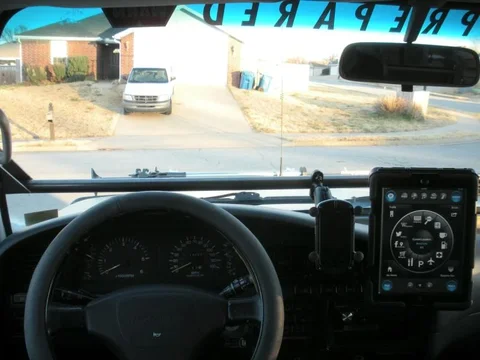
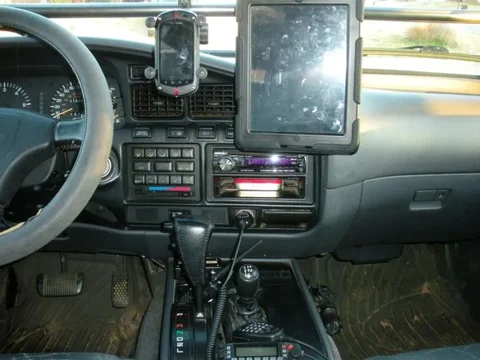
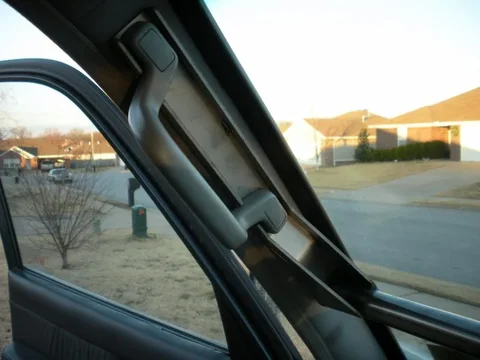
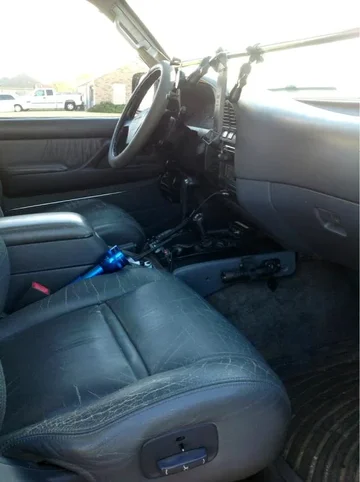
Good thread. I've been using Motion X on my iPad 3 for a while. We've got it mounted on our prototype gadget bar. Works good so far!
iPad and cell phone are both attached with Ram Mounts. I'm also going to add some other goodies to the bar...like gopro mount and one of those cupholders that doesn't spill!
View from driver position:
View attachment 712301
Other views:
View attachment 712302
View attachment 712303
View attachment 712304
Sent from my iPad using IH8MUD
That's pretty buggy in my book. Motion x has had 100% up time for me.
Sent from my iPad 2 using IH8MUD
Try the Dual Electronics Bluetooth GPS antenna. It works great!
HOLY CRAP TIM!!!!!
I was working on almost the exact type of solution!! I hadn't gotten far enough along to get into detail with it. I am using 19mm aluminum tube which attaches from A-pillar to A-pillar. I work for a film industry manufacturer so some of the accessories we design and manufacturer are either based on 15mm or 19mm rods. That means I could then use all of my own accessory mounting options such as...
[URL="http://cdn2.bigcommerce.com/server2500/1a41b/products/517/images/1543/HS_Speedy__28428.1356113874.800.800.png"][/URL]
[URL="http://cdn1.bigcommerce.com/server2500/1a41b/products/517/images/1576/cold_shoe_vlock6__28613.1356652355.800.800.jpg"][/URL]
Or this to mount other flatish items:
[URL="http://cdn1.bigcommerce.com/server2500/1a41b/products/503/images/1511/v-dock2__77210.1353359637.800.800.jpg"][/URL]
Plus some shock isolated mounting if needed:
[URL="http://cdn1.bigcommerce.com/server2500/1a41b/products/67/images/473/drive_mount7__45735.1309561610.800.800.jpg"][/URL]

Those mounts look pretty slick! And I don't know much about video equipment, but I know that anything with the word "RED" on it is expensive!
We just used 1" tubing on the prototype bar you see in my pics. I'm thinking that the next one will have a heavier wall 1" tubing on it. I used 0.083" wall on this one, and it's stout, but there is a certain frequency that my tires produce at low speeds that causes the bar to resonate. So if you're looking to use something like 19mm in size, I'd probably go with solid bar stock for this app.

Rob,
What's your take on the mini, vs. the 2 vs. the "New iPad". if you had to buy an iPad now for nav use what model would you choose and why?
I've been running motionX on my iPhone now for 6months and am ready to move to the iPad.
Thanks!
Matt
AFAIK, the 3G Mini Ipad doesn't have the GPS chipset so it'd be limited to areas with cell service.
hopefully they'll add the GPS receiver to the 2nd gen.
RobRed said:Your information is incorrect.
First the Mini + Cellular is 4g. Second all cellular capable iPad (mini included) have GPS chipsets built-in. Cell plans not required for GPS use.
This should clear things up for you http://forum.tlcfaq.com/viewtopic.php?f=6&t=26

