Trying hard to like MotionX

This site may earn a commission from merchant affiliate
links, including eBay, Amazon, Skimlinks, and others.

Joined
Jul 20, 2010
Threads
155
Messages
6,189
Location
N43.875, W121.455
Website
www.instagram.com
I'm frustrated by both of their products, Drive and GPS but at the same time can't find anything better.

GPS works ok for offload but the topo maps offer no more trail info than my buddy's Nuvi. And it takes days, not hours, to download tiles for just a portion of the state.

Drive outright sucks if you don't pay for the voice guidance which is required for routing features even if you turn off the voice.

Thinking about trying the $50 garmin app. Any other favorites? Google and the default both navigate well on road but lack trip computer features.
 
From the standpoint of Nav only, the iOS (Tom-Tom) Nav or GoogleMaps app work great (assuming 3G). They don't, however, have other nice features like altitude readout, POI lookup by type, trip computer, etc. One thing I really like about the Nuvi is that it displays your current speed and it turns red when XX over the posted speed. Handy feature to have when running oversized tires. And on long trips, I like to 'game' the computer to see if I can beat the predictions, keeps me awake. No go on iOS/Google.

How does GPS Kit do with downloading tiles? Is it a multi-day thing like with MotionX?

I feel like MotionX got popular and then stopped improving.
 
That's true about Drive and the other features it has, I have it, I used to pay for it, and don't anymore as the builtin apps do it for me. Of course it's easy to lookup poi via yelp app and others.

GPS kit downloads faster than Mx and currently still has all the map options Mx lost and a few more. Honestly I still use Mx because the interface is the most "device like" with large buttons. Gaia has been getting better but the interface for use in the truck is not great. Functionally good though.

I think you are right about Mx, full power is licensing their sensor technology which is probably a bigger business than $2 apps.

image-617401646.webp


image-3609164775.webp

image-617401646.webp


image-3609164775.webp
 
I had a Garmin Nuvi for years and I liked it a lot.

When I was up for a new Verizon phone I retired my old smart phone to vehicle duty and I wanted it to do what the Garmin did and offer more.

It's an Android phone but I use Co-Pilot for street navigation and Backcountry Navigator for topo maps. Both work offline/off network and all the maps and data are stored on the phone.

If you're stuck with an I phone I would buy an Android phone with GPS and wifi to use strictly off the network. You'll need the wifi to access the Google Play app and to download maps.

After using the two apps mentioned above I don't have plans to use the nuvi or the network for navigation. I do have the pay version of both apps but together they were probably $20 and worth every penny. I can use the apps on my phone or tablet.

This is BCN (BackCountry Navigator) on the phone.
20130422_164352.jpg


And this is the tablet.
20130330_163741.jpg


I started with a vehicle specific ProClip mount and added an accessory clip. One is specific for my phone and the other is specific to my tablet. Rock solid on trails and potholed freeways.
 
I have played around with many apps but still find MotionX and Motion Drive to be the ones I still always use. I have the Dual bluetooth GPS and a WiFi hotspot for the iPad. I do wish I didn't update MotionX when they changed their maps. I don't pay for Drive and it works ok for city driving. One gripe would be that it doesn't update ETA on its own, you have to it "recalculate".
 
Google maps are back with the most recent update. Haven't played around with it any to find out if there are anymore new features.
 
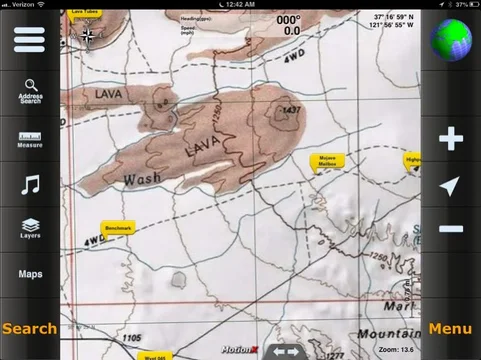
This version doesn't restore the downloadable Bing maps. V21 does get Google maps back as cacheable not downloadable. There is a cosmetic make over which I think improves usability. Waypoint storage increased from 500 to 2500. An interesting new feature is an in App purchase for $4.99 that gives you the ability to load maps from other providers like USGS etc via URL. Nice addition that restores your ability to use bing, google usgs and others offline.

[edited above re custom maps to reflect field usage]
 
Last edited:
That is fantastic Rob. Just read the post and tried it! Thanks!
 
Can you get better than 100k maps (appears to be what the pic above shows) with Motion X?

I'd really like to try it, but use Android.
 
Thanks Rob. I just downloaded a few gigs of Satellite maps for some future trips. This new feature now justifies mounting an iPad mini in my truck
 
^ Rob...my put down of MotionX was at v16 or so; but with the ability to use other map data, apart of subsequent MotionX versions, I have a renewed interest in using MotionX.

Undoubtedly, there is an answer somewhere here or your thread on EP...go ahead call me a lazy searcher :D: Can you easily outline a route prior to a trip and store it by name in MotionX including any notes along said route? Ditto using the GPS track from MotionX after a route has been run? Can all the named routes be easily organized and filed? Ditto for searching for either a route or a note within a route?

Thanks,

Dan
 
Dan you can create routes and way points outside of Mx and import via iTunes or email. Google Earth can create the kml files. There is no route creation tool inside Mx. ie. draw a route on screen with finger or stylus. A recorded route or waypoints can be exported via the same methods above. The tracks can be named and filed/organized within Mx. Notes are part of the waypoint entry in Mx.

So yes to most of what you asked except pre-creation of a track.
 
Back
Top Bottom