Nav Delete Help

This site may earn a commission from merchant affiliate
links, including eBay, Amazon, Skimlinks, and others.

Joined
Jul 29, 2020
Threads
21
Messages
99
Location
Denver, CO
Hi All,

I just got the Jerryb harness to do the nav delete on my 03 LC.

I plan on grabbing the atoto double din on amazon and metra harnesses 70-8114 Steering Wheel Control, and the long Metra Electronics 70-8113 to plug from back of the new radio to the speaker wires by the factory amp.

Im pretty damn mechanically inclined, but this project seems a bit much for me. Is there anyone our in the Denver area who's done this or would be willing to help me square this away?

Thanks!
 
Sorry I can't help, but where'd you find the JerryB harness?
 
I'll follow this......I am intimidated by this on my '06. I'd also love for some guidance on the factory parts to accumulate over time for a more factory approach. I've read a LOT, but it just seems to be a bit of a moving target or inaccurate info to follow.
 
Having just completed my nav delete, I can tell you the JerryB harness will make it a dead simple, plug-and-play job. I went the route of hardwiring and it took me about 7 hours of careful cutting and splicing.

My advice it to get your UART wires from the connector to the right of the glove box, and not from the 'combination meter' (instrument cluster). In my opinion you NEED to have the wiring book for your model year if you want to do a nav delete. It will help you locate and label everything before you start.

Here are the factory parts I needed for my '04. Plug your VIN into partsouq and double check everything against your model year. What's cool about partsouq is that even though our US models only came with nav, you can see the equivalent non-nav parts for the same vehicle.

Part NumberDescription
55902-60110PANEL SUB ASSY, A/C
55912-60150HOUSING, HEATER CONTROL
84014-60190BOARD SUB-ASSY, PRINTED WIRE INTEGRATION
88650-60810AMPLIFIER ASSY, A/C
55905-60780KNOB, HEATER CONTROL
83240-60220CASE ASSY
83265-60220COMPUTER
86208-60030Bracket Sub-Assy, Radio Receiver, LH
86207-60030Bracket Sub-Assy, Radio Receiver, RH


And here is my guide for installing a radio once you've done your nav delete.
 
Also PSA. If you need 88650-60b80 AC AMP for latter year land cruisers, Denso still makes them. I was able to get a new one from Carmarka/toyotadxb. They are made to order and lead time is about 6 months. That is the only place that I was able to find that part. Might be worth contacting them to see what they say. Your mileage may vary. Also, does anybody have a JerryB harness that they are willing to sell me? DM me please
 
Having just completed my nav delete, I can tell you the JerryB harness will make it a dead simple, plug-and-play job. I went the route of hardwiring and it took me about 7 hours of careful cutting and splicing.

My advice it to get your UART wires from the connector to the right of the glove box, and not from the 'combination meter' (instrument cluster). In my opinion you NEED to have the wiring book for your model year if you want to do a nav delete. It will help you locate and label everything before you start.

Here are the factory parts I needed for my '04. Plug your VIN into partsouq and double check everything against your model year. What's cool about partsouq is that even though our US models only came with nav, you can see the equivalent non-nav parts for the same vehicle.

Part NumberDescription
55902-60110PANEL SUB ASSY, A/C
55912-60150HOUSING, HEATER CONTROL
84014-60190BOARD SUB-ASSY, PRINTED WIRE INTEGRATION
88650-60810AMPLIFIER ASSY, A/C
55905-60780KNOB, HEATER CONTROL
83240-60220CASE ASSY
83265-60220COMPUTER
86208-60030Bracket Sub-Assy, Radio Receiver, LH
86207-60030Bracket Sub-Assy, Radio Receiver, RH


And here is my guide for installing a radio once you've done your nav delete.

Thanks Seventh! Luckily i've got all the parts needed for the Nav delete portion, I think this is the easy part, especially with the JerryB harness. Im more worried about the radio install, since id love to just keep using the factory amp and not have to cut wires or run a new amp
Also PSA. If you need 88650-60b80 AC AMP for latter year land cruisers, Denso still makes them. I was able to get a new one from Carmarka/toyotadxb. They are made to order and lead time is about 6 months. That is the only place that I was able to find that part. Might be worth contacting them to see what they say. Your mileage may vary. Also, does anybody have a JerryB harness that they are willing to sell me? DM me please

Is this the amp that could be plug and play for a stero install with the nav delete for later cars?

I'll follow this......I am intimidated by this on my '06. I'd also love for some guidance on the factory parts to accumulate over time for a more factory approach. I've read a LOT, but it just seems to be a bit of a moving target or inaccurate info to follow.

If I get it figured out, you'd be welcome to come by my spot in Englewood to get yours done too.

Sorry I can't help, but where'd you find the JerryB harness?
I was the last person on his list to be able to get one before he stopped making them, contacted him last year, got harness just a week ago.
 
Thanks Seventh! Luckily i've got all the parts needed for the Nav delete portion, I think this is the easy part, especially with the JerryB harness. Im more worried about the radio install, since id love to just keep using the factory amp and not have to cut wires or run a new amp


Is this the amp that could be plug and play for a stero install with the nav delete for later cars?

The 'amp' he was talking about, and the one from my parts list, are for controlling the air conditioning. They aren't a part of the radio system.

In my install I had no problem using the factory radio amp. Seems like most aftermarket head units come with two sets of sound outputs, amplified and non-amplified. I used the non-amplified ones and connected up the amp ground and power wires on the Metra harness.

For reference here is my factory radio, it's the JBL system.

1723570429877.webp
 
@SeventhDurandal thats awesome!! First im hearing that a stock amp can be used, i hope my radio comes with non amplified outputs.

Did you use Metra Harness 70-8113, or a different one?
 
I'm going to write a public apology to not answering PMs or emails. I just can't make those harnesses anymore. Life has changed.

Instructions are all over mud to make your own.
I published a list of parts and how to's and hardwiring instructions over the years. You just need to search. Sadly, searching is not part of current mud masses list of abilities. Blame facebook.

the Carmarka post above is great info to keep on hand for the 06-7 LCs
 
I'm going to write a public apology to not answering PMs or emails. I just can't make those harnesses anymore. Life has changed.

Instructions are all over mud to make your own.
I published a list of parts and how to's and hardwiring instructions over the years. You just need to search. Sadly, searching is not part of current mud masses list of abilities. Blame facebook.

the Carmarka post above is great info to keep on hand for the 06-7 LCs
You've done an amazing job documenting and writing out instructions, along with providing the community with these amazing harnesses. Thank you for it all!
 
@SeventhDurandal thats awesome!! First im hearing that a stock amp can be used, i hope my radio comes with non amplified outputs.

Did you use Metra Harness 70-8113, or a different one?

Yes that's the one! I think there are a few different sound systems used across the years of LC/LX.... so your mileage may vary. Maybe I just got lucky.
 
I have what I believe to be a PIN 60 malfunction on the MFD. Since we have no need for nav or cd player, trying to decide the correct approach.
It seems like I can do the PIN 60 repair
Send it in for repair
Replace the board
I'm not going to spend the money on a rebuilt MFD
I have only found one thread on someone replacing with the Rhino Radio

It seems like the Rhino Radio seems the most straightforward. We use our iPhones for everything anyway. I don't remember the part I used to attach the aux cable to the stereo, but it's been working for a decade.

This navigation delete looks way out of my scope of ability.

Anyone see many of these Rhino Radios in the real world?

Thanks
 
I probably can't help anyone because I did this mod back in 2019 but if you are going to do it I'd replace everything....speakers...amps...wiring...everything.

I ended up selling the items I removed for about $900. I had 40-50 hours in the swap but I took my time and did it right. If you are on the fence and plan on keeping the vehicle I'd source the parts now. You can always sell them later if you change your mind.
 
I have what I believe to be a PIN 60 malfunction on the MFD. Since we have no need for nav or cd player, trying to decide the correct approach.
It seems like I can do the PIN 60 repair
Send it in for repair
Replace the board
I'm not going to spend the money on a rebuilt MFD
I have only found one thread on someone replacing with the Rhino Radio

It seems like the Rhino Radio seems the most straightforward. We use our iPhones for everything anyway. I don't remember the part I used to attach the aux cable to the stereo, but it's been working for a decade.

This navigation delete looks way out of my scope of ability.

Anyone see many of these Rhino Radios in the real world?

Thanks
The nav delete isn't "hard", it's just time consuming and you need to allot a day or so to get it done. Its so nice not to have to deal with the antiquated display. If you have a 2006 I know it's a bit more involved than on the earlier years. On a 98 I labeled all the wires before disconnecting anything and new swapped the wires one at a time. I removed the pins and avoiding cutting wires when I could.
 
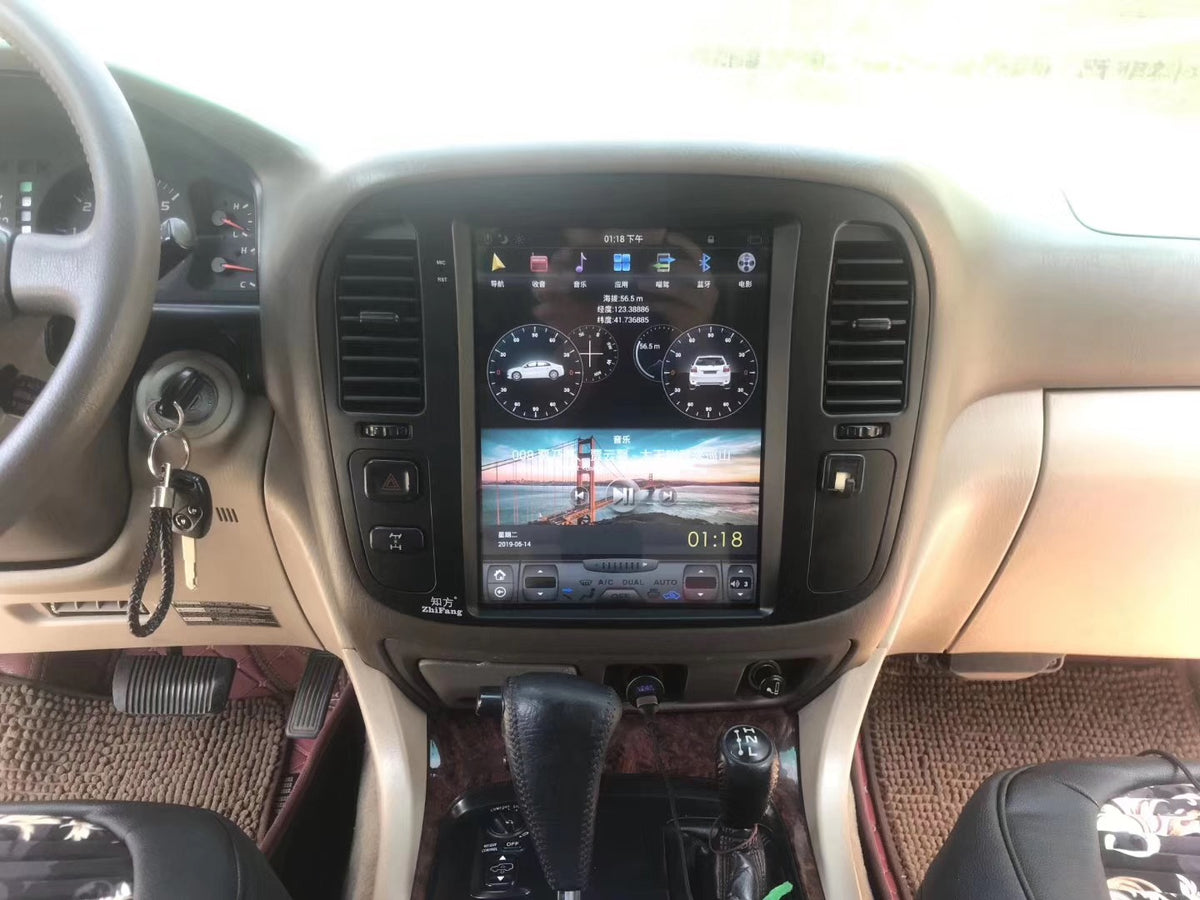
Has anyone tried these as a replacement for the 2003 and newer nav units?
"Plug and Play into factory head unit" is an interesting statement! 2 year warranty is also interesting. Have you reached out to them for conversation?
 
"Plug and Play into factory head unit" is an interesting statement! 2 year warranty is also interesting. Have you reached out to them for conversation?
Yeah they say it works and controls all the factory climate functions, but I haven't been able to find anyone that actually has one to get the real story.
 
Yeah they say it works and controls all the factory climate functions, but I haven't been able to find anyone that actually has one to get the real story.
Seems like it "could" work as the original head unit is retained, and the carplay function is housed in this replacement screen......I have an 06, so difficult to update. This is interesting.
 
Seems like it "could" work as the original head unit is retained, and the carplay function is housed in this replacement screen......I have an 06, so difficult to update. This is interesting.
I noticed this one for sale on this site, and he has one installed, I sent a message to get his feedback on it.
 
Yeah they say it works and controls all the factory climate functions, but I haven't been able to find anyone that actually has one to get the real story.
The problem with most aftermarket HUs in the LCs is the "hiss" from the rest of the system. Quite a few examples of LC owners using the T'eyes CC3 + replacement amp as the quickest way to solve the Pin 60 / Android Auto / Apple Carplay / out of date maps etc etc issues.

Unfortunately this won't work in US LCs or LXs. Australian LCs had separate climate and head units, this is for that market.

This option works in US LCs - T'eyes CC3 for LC100 - you need option "C"

A few have also reported success with the Soundstream Nano 5 channel amp:

This gets you a bang up to date interface with wireless AA and CP, as well as normal climate control functionality. You can change the speakers at the same time, or sort them out later.


This one is a Lexus - the simplest (and cheapest) fix is the T'eyes CC3, no amp hiss and it's plug and play into the ML audio system. The LC100 is a different beast multimedia-wise.
I noticed this one for sale on this site, and he has one installed, I sent a message to get his feedback on it.
 
Last edited:
Back
Top Bottom