Mods and Indash Nav

This site may earn a commission from merchant affiliate
links, including eBay, Amazon, Skimlinks, and others.

Carputer

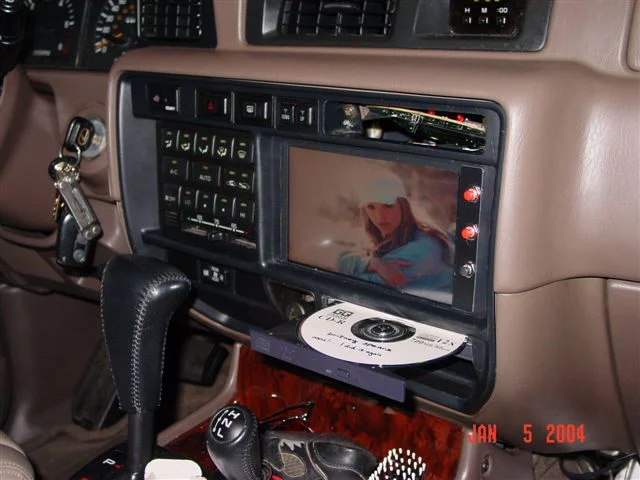
Here's my setup: It still works but the touchscreen portion died on me. I now have a mouse connected to the laptop. It plays DVD's, mp3, Routis navigation, FM radio, MCE record TV, obd2 diagnostic, and I can surf the web it I'm close enough to a wifi hotspot. I'll see if I can find some more pics.
Picture%20014.webp
 
mot said:
Hugh,

Any pics of (any of) the stuff you mentioned? Or just use regular consumer computer products and fit them anyway you can?

It sounds pretty cool though, I'm interested in mobile entertainment and security (including not getting lost). I'd love to see a complete set-up someone has done with detailed component/installation information someone has done (even if not in a Cruiser).

Mot


MOT, are NavSys popular in Japan?
How's it like to drive out there compared to the States or Europe?
 
firetruck41,

Thanks a lot for the tip. I hope I won't be spending hours looking into it. ;)

Greddy0,

Pretty sweet. Did the touch screen die on you because you were pushing on it with while eating Doritos or fries? :D

E,

They are all over the place.

As I said, I did not think I would be using it very much, but now I can't imagine being w/o it. :rolleyes: :D

Sometimes it gets confused as to exactly which direction we are heading with narrow streets, which can be REALLY narrow (Koffer can attest to that) and skyscrapers.

But all in all, they work superbly.

They have this option now that you can get a rea-time traffic (jam) information and your navigation can give you alternate route and stuff. (I don't have it, I'm too cheap).

Also you can get cell phones now with navigation built in (do you get them in the US, too?). They also have a cell phone adaptor unit which I don't kno exactly how it works, but you get a mounting unit, etc... for the car with it, etc... etc...

You get butt-load more of varieties here. Let me see if I can post some links. I would love to get portable ones (DVD or HD based). I know you can' t read Japanese, but enough texts are in English, right? :D :

http://www.kakaku.com/sku/pricemenu/carnavi.htm

kakaku.com is probably the best online electronics site in Japan. If you click on enough links you'll know who offers the cheapest prices, their feedback (in Japanese) and comparison and stuff.

By the way, ADDZEST is Clarion (I think) and CARROZERIA(sp) is Pioneer, just an FYI.

Just to walk you through it a little, just click on the manufacturer link and then you'll see their models and their online prices of different shops (100 yen to the $1US (10000 yen is about $100US).

Click on any models and you'll be able to see the cheapest Net price in red and avg. price in ( ), customoer feedback toward the bottom (if there's any and also this could be easily manipulated by nav. comp. employees, but...).

You can also click on the manufacturer link toward the top in blue under their suggested retail price to look at their offerings.

Anyway, maybe not for everyone, but thought it might entertain you with what (else) you can't have in the US. :D

example:

Panasonic HD nav.:
http://panasonic.jp/car/navi/products/index.html

DVD:
http://panasonic.jp/car/navi/products/index2.html

Portable:
http://panasonic.jp/car/navi/products/index3.html

Updated maps, etc...:
http://panasonic.jp/car/navi/products/map/index.html

Anyway, FWIW.

Enjoy!

Mot

 
Greddy0, correct me if im wrong is that shoes next to the H & L shifter???
By the way, also i think we had mentioned the Double Din on the other thread isnt it:idea:
and you guys mount the monitor too low..ill be damn hurt my neck by looking at it.. :flipoff2: hmm.. should we post the pics of the comfortable / njoy the view while driving
then? :D Right Mot? :D
 
Last edited:
EnDLeSS,
It would be easier to view, but ya gotta dig the flush indash look.

Kenwood touchscreen DVD/Navigation
lxdvdopen.webp
lxdvd.webp
 
Mot - sorry for the delay- it looks like others have handled it for me! I just keep going back to the theory that you just want a 'box' that can run stuff - then you can keep adding new software to do cool stuff vs. have some box that is only dedicated to one or two funtions (eg nav and radio)

Cheers, Hugh
 
From what I can tell, the poor man's version is to run a laptop (under seat or in the rear) and have the screen up front. A few more bucks gets you a single or double din sized unit - really amazing stuff. However, I don't think I would spend US$1,00o - $2,000 for a ready made unit - I would think that with some help I could build one for closer to $500 + screen.

Cheers, Hugh
 
I went the poor mans version as I didnt have the money up front... LCD (Touch) Screen with a Laptop and OziExplorer... Works for me...

There is a Thread if you search with all the alternatives for a DIN unit...

There are pic's as well...
 
what i would love to fo and it could be done for about $700 is get one of the new macs the tinly ones that would fit perfetly in a single din spot in the dash then run touch screen. the new macs are only $500 and would be great for everything.

mike
 
lx450landcruiser: Where would you get a touch screen to fit into the double din spot and how would you wire power? Seems like a good idea, and I would like some more details. Thanks
 
not entirly sure on the power most here would know better then I maybe just a power inverter? that way you could take it out if you wanted to? Some here have hard mounted lap tops so it would be about the same. As for the touch screen they can be purchased in almost any size. some one earlier in this thread had on int here set up already (see pics) What i was thinking was getting the mac to fit in one of the single din areas then buying say the pioneer singe din oen that have the screens come out. then you use the same amount of space but have way more. The only draw back i see with it is macs least a bit ago wernt very GPS compatable although now more are around. Think you could have your entire Itunes in your car with out an ipod.
 
Back
Top Bottom