

Navigation
Install the app
How to install the app on iOS
Follow along with the video below to see how to install our site as a web app on your home screen.
Note: This feature may not be available in some browsers.
More options
Style variation
You are using an out of date browser. It may not display this or other websites correctly.
You should upgrade or use an alternative browser.
You should upgrade or use an alternative browser.
Can rear passengers listen on headphones and fronts seats be on different source?
- Thread starter brasskey
- Start date
This site may earn a commission from merchant affiliate
links, including eBay, Amazon, Skimlinks, and others.


Yes if kids use the wireless headphones you can listen to what u want.

I'd have to look at the screen for exact setting but I do it through the main screen. Haven't done it through the remote before. Once the movie is playing go to rear setting on main screen and toggle between the 3 options. Best way is put headphone on 1 ear and play with it then write down the option that worked.

We ran into this just this weekend. My wife was messing with it when I was driving but here's what I remember on getting it to work right:
1) audio button, go to "disc" assuming you are playing a dvd.
2) there should be an icon showing what is playing through the speakers and what is playing through the headphones.
3) there is a rear lock button that I believe locks/unlocks all audio from being on that single source.
4) once the headphones are on the right source you should be able to press audio and then change the source you want for the trucks speakers.
Then press a-b-a-b-b-a, select, start. (Kidding on the last part!)
It's something like that, sorry I don't remember the exact button press order.
You should be able to have the headphones playing the right input and the vehicle speakers playing another source-fm, bt audio, etc.
1) audio button, go to "disc" assuming you are playing a dvd.
2) there should be an icon showing what is playing through the speakers and what is playing through the headphones.
3) there is a rear lock button that I believe locks/unlocks all audio from being on that single source.
4) once the headphones are on the right source you should be able to press audio and then change the source you want for the trucks speakers.
Then press a-b-a-b-b-a, select, start. (Kidding on the last part!)
It's something like that, sorry I don't remember the exact button press order.
You should be able to have the headphones playing the right input and the vehicle speakers playing another source-fm, bt audio, etc.
Definitely possible. I think the rear entertainment always plays through the wireless headphones by default. The buttons on the dash select the audio source for the main speakers. If you push DISC, the movie will play through the speakers but if you select FM it will play the radio through the speakers while the headphones still play the movie.
- Thread starter
- #11
Thank you. I got it figured out. It seems like making sure 'Speaker Output' is not selected in the 'Rear' menu is the trick. It's annoying that the headphones don't work in the front seats when I was trying to check this out. I had to turn them up loud and set them on a rear seat to make sure it was working. I looked in the manual and I guess they have a sensor right past the rear seats where the headphones won't work in the front seats. Seems strange to have that as there's no video to watch on the front screen anyways.

If you're in park the movie will play on main screen up front. May have to have parking brake on as well. Can't remember.Thank you. I got it figured out. It seems like making sure 'Speaker Output' is not selected in the 'Rear' menu is the trick. It's annoying that the headphones don't work in the front seats when I was trying to check this out. I had to turn them up loud and set them on a rear seat to make sure it was working. I looked in the manual and I guess they have a sensor right past the rear seats where the headphones won't work in the front seats. Seems strange to have that as there's no video to watch on the front screen anyways.
- Thread starter
- #13
If you're in park the movie will play on main screen up front. May have to have parking brake on as well. Can't remember.
Always wondered why the screen was blank when I was in park. Just tried the emergency brake and that turned the on the screen on the front display. Thanks.
Last edited:

Apologies for resurrecting this old thread.
I have the 2018 LC and I can't seem to get this working, the screen output is a bit different.
So here's what I'm doing:
1. Starting with SAT radio playing
2. Inserted DVD disc, movie audio is now on all speakers even headphones.
3. I tried the above suggestions but I can't seem to change the Source back to SAT, if I do it, the DVD/movie stops. SAT audio is heard on all speakers and headphones.
If someone has success on this (on same LC model) if you can please list step-by-step?
TIA!
I have the 2018 LC and I can't seem to get this working, the screen output is a bit different.
So here's what I'm doing:
1. Starting with SAT radio playing
2. Inserted DVD disc, movie audio is now on all speakers even headphones.
3. I tried the above suggestions but I can't seem to change the Source back to SAT, if I do it, the DVD/movie stops. SAT audio is heard on all speakers and headphones.
If someone has success on this (on same LC model) if you can please list step-by-step?
TIA!
It's annoying that the headphones don't work in the front seats when I was trying to check this out. I had to turn them up loud and set them on a rear seat to make sure it was working. I looked in the manual and I guess they have a sensor right past the rear seats where the headphones won't work in the front seats. Seems strange to have that as there's no video to watch on the front screen anyways.
So . . . we didn't get the rear entertainment system in our 2019 . . . but did get the headphones. Can they be used by driver/front passenger, or only our dogs in back?

- Joined
- Feb 16, 2011
- Threads
- 16
- Messages
- 146
So . . . we didn't get the rear entertainment system in our 2019 . . . but did get the headphones. Can they be used by driver/front passenger, or only our dogs in back?

Apologies for resurrecting this old thread.
I have the 2018 LC and I can't seem to get this working, the screen output is a bit different.
So here's what I'm doing:
1. Starting with SAT radio playing
2. Inserted DVD disc, movie audio is now on all speakers even headphones.
3. I tried the above suggestions but I can't seem to change the Source back to SAT, if I do it, the DVD/movie stops. SAT audio is heard on all speakers and headphones.
If someone has success on this (on same LC model) if you can please list step-by-step?
TIA!
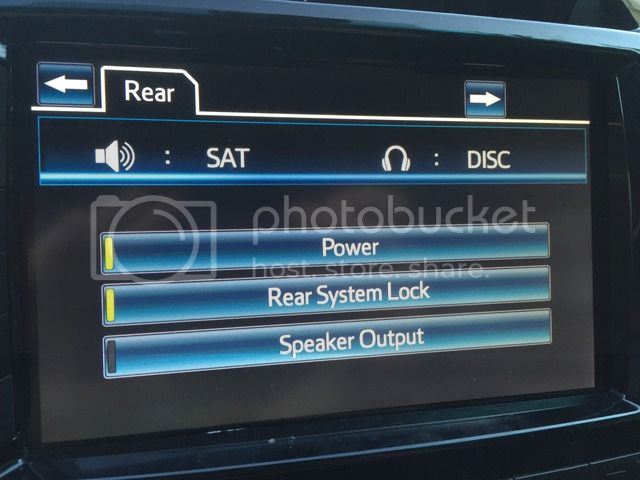
Finally got it to work!
- car running in parked and SAT radio playing.
- turn on rear headphones and screen using the remote controller
- insert DVD, audio will be on all speakers and headphones
- go to audio rear setting menu, see photo for settings, only power is enabled
- go to remote controller and select source, select DVD, at this point dvd audio is on the headphones, no sound on other speakers
- go to source menu and select SAT. You will now have audio separate from the dvd movie.
hope this helps

Same as above. Use remote to select audio/video source from back seat. Put in DVD switch front source to whatever you want. Back seat uses remote to play/navigate movie. Headphones only work in back because of the infrared transmitters are rear facing. You can't use the IR headphones in the front seat as mentioned above. Also, they would be useless due to the fact that you can't see the screen playing the movie from the front seat anyway. So to break it down on my 2011 with the overhead screen...Can anyone post the instruction to do the same on an older 200? 08-10
1. put in DVD
2. upen rear screen with remote or via head unit (accessed on display page)
3. Verify/select source with remote from back seat on overhead monitor
4. Rear can control everything from this point with remote
5. change front source to sat/nav/whatever audio you want
6. enjoy peace and quiet from the kiddos.....