Ultragauge mounting ideas

This site may earn a commission from merchant affiliate
links, including eBay, Amazon, Skimlinks, and others.

nibot

SILVER Star
Joined
Dec 3, 2012
Threads
10
Messages
73
Location
Houston, TX
Had an Ultragauge in my 80 series and found it pretty useful.

Looking to mount one in the 200 and can't decide on the best location. Leaning toward the area just above the lighter in the center stack but want to see what others have done. Any other suggestions?

Thanks.
 
do you have any pictures of it?
 
Had an Ultragauge in my 80 series and found it pretty useful.

Looking to mount one in the 200 and can't decide on the best location. Leaning toward the area just above the lighter in the center stack but want to see what others have done. Any other suggestions?

Thanks.

Call me a greenhorn...but I don't know what you mean by an ultraguage. What is it?
 
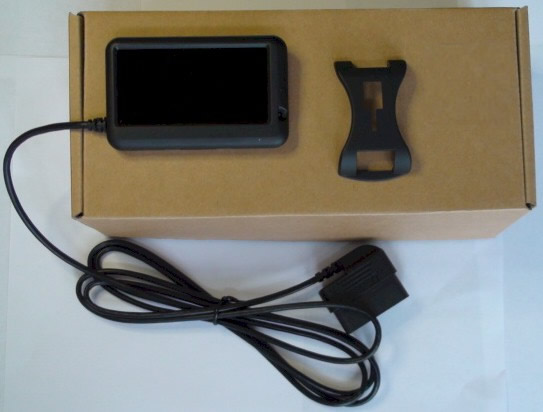
T4Runner is correct. Device looks like the below
UG_EM_wo-mount.JPG


I mounted the one in my 80 in a similar location in the center stack and it worked well. Easy to see when needed but was not distracting.
20422078658_f8e3a02edf_z (1).webp
 
After sitting in the truck and looking at the various options, decided to try mounting it right above the "View" button to the right of the steering wheel. Doesn't block any of the gauges / displays and is easy to see. This also allowed for a relatively clean run of the cord.

Still working to get the programming 100% but so far so good.

For those unfamiliar with the functionality, a user (Grungle) on the LCool forums has gone through and determined functionality that works with the LC. It seems like some adapting is needed for his codes to work on US spec vehicles but a lot of it can also be found on the tacoma / tundra forums.


IMG_3294.webp

IMG_3301.webp
 
I just read up on the Bluetooth version.

Looks like a very very versatile option if you have an old iPhone or iPod Touch handy. Many screens, selectable, color, etc. Fairly cheap at $79 too. Might try one and see how it goes, as I have an iPhone 5s I'm about to retire (me eyes can't see any more! need bigger screen...ugh).

Have you any experience with the Bluetooth version?

What I like about it is...it stays attached, collecting data--whether you have a device connected or not. And...in the case of a dedicated device (old phone), the display is quite brilliant!

M
 
I haven't used the Bluetooth version. I believe it is fairly new. Not sure how it differs from some of the other android / iOS options like Torque.

I wanted something that I didn't have to turn on / charge / mess with each time I drove the car. That is what led me to the ultragauge vs a phone based system.
 
I haven't used the Bluetooth version. I believe it is fairly new. Not sure how it differs from some of the other android / iOS options like Torque.

I wanted something that I didn't have to turn on / charge / mess with each time I drove the car. That is what led me to the ultragauge vs a phone based system.

Ya, if I did a phone...it would be dedicated...with no pass-code and no phone function. Might dump a bunch of music on it, but would stay mounted in truck. Minimal fiddling, as when you start the vehicle...it turns on, and you simply swipe it and done. Have a look at the web-site. There are a TON of screen customizations...

I do see the appeal of your device choice though.

I'm a little concerned about limitations of Toyota's code usability.
How would you describe that part so far?
 
You can order the Ultragauge MX 1.3 pre-programmed for the Tundra / Tacoma CAN. This is in addition to the normal OBDII gauges.

The additional Toyota gauges include the following per the paperwork that came with the gauge:
- Kilometers per Hour - described as same as the standardized KPH
- Barometric Pressure
- Air Fuel Ratio
- Transmission temperature F
- Transmission temperature C
- Injector time
- Lock up converter status
- Evaporative system PSI

It seems that some of these require some tweaks for the LC. I am still playing around with these. I have gotten the transmission temps to work. Will report back once i try the other built in gauges.

A search of LCool shows there is the potential to show the shift position in Drive (1-6) as well as a hotter and colder transmission fluid temp reading and alternator duty cycle. For full disclosure, I have not gotten the shift position to work on mine yet and have not tried the additional fluid temp or alternator duty cycle codes yet.

Ultragauge also provides instructions to convert Scangauge codes to M gauges (what they call the additional gauges).

After looking at the website, the bluetooth setup does look nice.
 
You can order the Ultragauge MX 1.3 pre-programmed for the Tundra / Tacoma CAN. This is in addition to the normal OBDII gauges.

The additional Toyota gauges include the following per the paperwork that came with the gauge:
- Kilometers per Hour - described as same as the standardized KPH
- Barometric Pressure
- Air Fuel Ratio
- Transmission temperature F
- Transmission temperature C
- Injector time
- Lock up converter status
- Evaporative system PSI

It seems that some of these require some tweaks for the LC. I am still playing around with these. I have gotten the transmission temps to work. Will report back once i try the other built in gauges.

A search of LCool shows there is the potential to show the shift position in Drive (1-6) as well as a hotter and colder transmission fluid temp reading and alternator duty cycle. For full disclosure, I have not gotten the shift position to work on mine yet and have not tried the additional fluid temp or alternator duty cycle codes yet.

Ultragauge also provides instructions to convert Scangauge codes to M gauges (what they call the additional gauges).

After looking at the website, the bluetooth setup does look nice.


Any luck on getting the gauges to work, i just put one on my URJ200 and haven't gotten trans temp to work yet, or even started on alt or gear pos. thanks in advance for any assistance. search did not come up with any actual values. I've tried ,


M Gauge 5 Exit

Abbr1:Trn Abbr2:*F

TData: 07E021D9000000

TCtrl:92 RCtrl: 10

RPos:1810 Mtch:210000

X:0001 /:0100 +:FFD8

Out Format:10 Ave:00

Left/Right:41

------------------------------


TDATA: 07E021D9

MATCH: 210000

TCtrl: 93

RPos 0808

RCtrl: 31 X: 0001 /: 0100 +: FFD8

Output format: 10 (for °F)

Output format: 00 (for °C)

Left/Right is 31
 
After sitting in the truck and looking at the various options, decided to try mounting it right above the "View" button to the right of the steering wheel. Doesn't block any of the gauges / displays and is easy to see. This also allowed for a relatively clean run of the cord.

Still working to get the programming 100% but so far so good.

For those unfamiliar with the functionality, a user (Grungle) on the LCool forums has gone through and determined functionality that works with the LC. It seems like some adapting is needed for his codes to work on US spec vehicles but a lot of it can also be found on the tacoma / tundra forums.
Just did the same place instalation. Thanks for idea.
Does anybody has an idea about enhanced codes for TLC? I'm interesting in both transmission gauges and gear position, but can't find proper codes.
 
Does anyone have experience with the BT version? I'd prefer the portability and have a couple of older phones that aren't being used.

It looks good on paper (well, on the website - even if the website is awful - I didn't know anybody used Netscape anymore :D ) but does anyone have "hands-on" experience?
 
The more research I do, the more questions I have. This is it - I think...

C-reader $40
Ultragauge $80 or
Scangauge $130 (coupon code at Advance Auto) ?

Does the Scangauge do significantly more (usable more) than the Ultra to account for almost double the price?
 
Back
Top Bottom