Stupid Question - How do I adjust the brightness of the NAV Audio screen?

This site may earn a commission from merchant affiliate
links, including eBay, Amazon, Skimlinks, and others.

Joined
Jan 23, 2019
Threads
126
Messages
2,557
Location
USA
I didn't want to start a whole thread about this, but couldn't find the 200 series stupid question thread.

How to I adjust the brightness of the NAV Audion screen on a 2016?
The nob by the trip only adjusts the cluster and not the NAV screen which can be very bright at night.

I can't seem to find how to adjust it in the settings or manual.
 
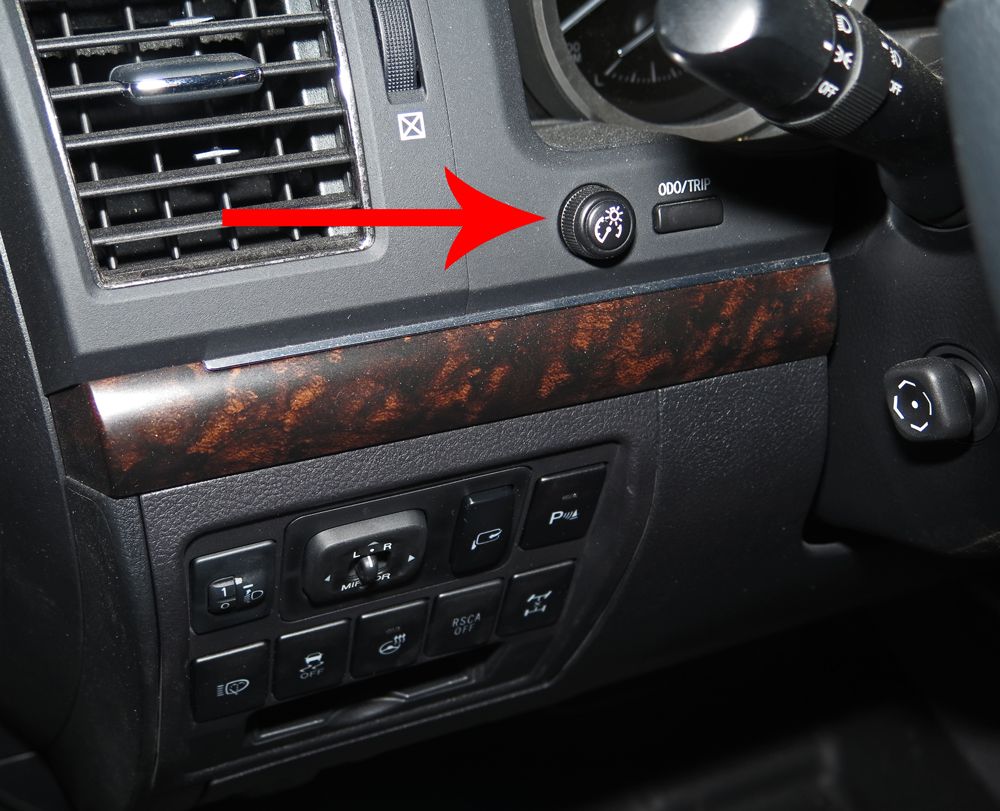
If your NAV screen is not automatically switching to Night Mode, it is probably because your little dash light adjustment knob is set to full bright. Turn that little knob down a little and your NAV screen should go into night mode.

HTH

Edit to add:

This is the knob you need to turn down (counter clockwise):

LCDashDimmer_06OCT17_zps54ltuoa3.jpg
 
The screen does switch back and forth to day and night mod when the headlights turn on and off, however the brightness of the nav screen I have been unable to find the adjustment.

On my other vehicle when I adjust the cluster brightness it also adjusts the NAV brightness, but on the LC200 it sodesn't and I have been unable for find where this adjustment is.

At night it's too bright and in the daytime it's not bright enough sometimes.

I'll take another look at the menu's today, but last time I was unable to find a brightness adjustment.
 
Check page 29 in your navigation system owners manual. That’s where display setup is in my ‘17 manual and it’s likely the same page in yours.
 
Hey, thanks for this “stupid question”. My NAV stopped dimming at night and I couldn’t figure out why. Could not find anything on the set up screens. Read this thread and turned the little knob on the dash and all better now. Not sure how it got bumped in the first place.
 
Back
Top Bottom